> For a complete documentation index, fetch https://docs.voximplant.ai/llms.txt
# xAI realtime TTS
Use [XAI.createRealtimeTTSPlayer](/api-reference/voxengine/xai#createrealtimettsplayer) to synthesize text as it arrives, for example from an LLM. Voximplant manages the xAI WebSocket connection and sends the generated audio to the call.
> **Note**
>
> For an agent that receives caller audio and generates responses directly, use the [Grok Voice Agent API](/voice-ai-orchestration/grok/overview). To combine separate STT, Grok reasoning, and TTS, see [Microsoft-Grok-Grok TTS](/voice-ai-orchestration/bring-your-own-llm/grok-full-cascade).
## Setup
Create a [VoxEngine scenario](/platform/voxengine/scenarios) and assign it to an application's [routing rule](/platform/voxengine/routing-rules). Route an inbound phone number, SIP user, WebRTC user, or app user to the rule. Require `Modules.XAI` in the scenario.
Pass `voice` and `language` in `connectionParameters` when creating the player. Both must be non-empty strings. The example uses `eve` and English (`en`). Voximplant fixes the audio format for telephony to PCM at 16 kHz.
### Optional: bring your own xAI API key
The `apiKey` parameter is optional. To use your own xAI account, store its API key in Voximplant [Secrets](/platform/voxengine/secrets) as `XAI_API_KEY`. The example reads it synchronously with `VoxEngine.getSecretValue('XAI_API_KEY')` and passes it only when present. Omit the secret to use Voximplant's provider credentials and TTS billing.
With your own key, xAI bills provider usage to your account; Voximplant connectivity charges also apply. See [Voximplant pricing](https://voximplant.com/pricing) for current rates.
## Custom voices
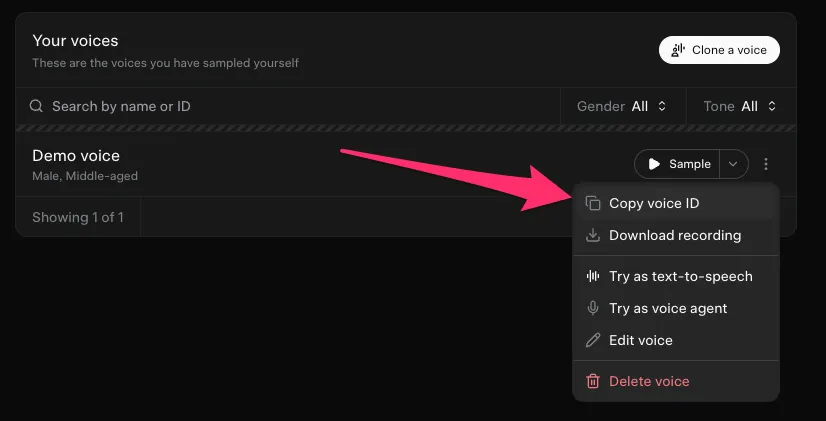
Create a custom voice in the [xAI console](https://console.x.ai/) or with the [Custom Voices API](https://docs.x.ai/developers/model-capabilities/audio/custom-voices). Use your own xAI API key with access to that voice. In the console, open the voice card's three-dot menu and choose **Copy voice ID**. Pass the copied string as `connectionParameters.voice` when creating the player.
## Speech tags
xAI supports inline tags such as `[pause]`, `[laugh]`, and `[exhale]`, plus wrappers such as `...`, `...`, and `...`. Use them sparingly to shape delivery. The scenario includes pauses, emphasis, and a whispered aside. See the [xAI speech tag reference](https://docs.x.ai/developers/model-capabilities/audio/text-to-speech#speech-tags) for the current set.
## Stream text into a call
The example waits for the incoming call to connect, creates a player, and streams six utterances on one connection. `streamText()` splits each utterance into chunks while preserving spaces and punctuation. It sends each chunk as `text.delta`, then sends `text.done` to finish the utterance. The chunks simulate text arriving from an application; a real LLM stream can supply its deltas directly.
```javascript title={"voxeengine-grok-tts.js"} maxLines={0}
/**
* xAI streaming TTS demo, adapted from Chad Hart's Grok TTS example (PR #56).
* Six utterances, expressive speech tags, and a timer-simulated interruption.
*/
require(Modules.XAI);
const TTS_TEXT = [
"Hello! [pause] Welcome to Grok text to speech with Voximplant.",
"This example streams several utterances on the same connection.",
"Speech tags can shape how a phrase is delivered.",
"This short aside uses a different delivery style.",
"You can use a built-in voice, or the ID of a custom voice from your xAI account.",
"The demo also shows how to clear queued speech and replace it with a new utterance. Goodbye!",
];
VoxEngine.addEventListener(AppEvents.CallAlerting, ({call}) => {
let player;
let nextUtterance = 0;
let finished = false;
let interruptTimer;
const terminate = () => {
if (finished) return;
finished = true;
clearTimeout(timeout);
clearTimeout(interruptTimer);
player?.stop();
VoxEngine.terminate();
};
const timeout = setTimeout(() => {
Logger.write("xAI TTS demo timed out");
terminate();
}, 60000);
call.addEventListener(CallEvents.Disconnected, terminate);
call.addEventListener(CallEvents.Failed, terminate);
call.addEventListener(CallEvents.Connected, () => {
try {
// Optional: omit the secret to use Voximplant's provider credentials.
const apiKey = VoxEngine.getSecretValue("XAI_API_KEY");
player = XAI.createRealtimeTTSPlayer({
connectionParameters: {
voice: "eve",
language: "en",
optimize_streaming_latency: 1,
},
...(apiKey ? {apiKey} : {}),
});
const streamText = (text) => {
// Keep whitespace in every delta; xAI concatenates the chunks.
for (const delta of text.match(/\S+\s*/g) || []) {
player.send({type: "text.delta", delta});
}
player.send({type: "text.done"});
};
player.addEventListener(PlayerEvents.Error, (event) => {
Logger.write("xAI TTS error: " + JSON.stringify(event));
terminate();
});
player.addEventListener(PlayerEvents.AudioChunksPlaybackFinished, (event) => {
if (finished) return;
Logger.write("xAI TTS utterance finished; TTFB (ms): " + event.timeToFirstByte);
if (nextUtterance < TTS_TEXT.length) {
streamText(TTS_TEXT[nextUtterance++]);
} else {
terminate();
}
});
[
PlayerEvents.Created,
PlayerEvents.PlaybackReady,
PlayerEvents.Started,
PlayerEvents.Stopped,
PlayerEvents.PlaybackFinished,
PlayerEvents.PlaybackMarkerReached,
PlayerEvents.PlaybackBuffering,
].forEach((eventName) => {
player.addEventListener(eventName, (event) => {
Logger.write("===xAI TTS " + eventName + "=== " + JSON.stringify(event));
});
});
player.sendMediaTo(call);
streamText(TTS_TEXT[nextUtterance++]);
// Simulate an application interruption; the player has no speech detector.
interruptTimer = setTimeout(() => {
if (finished) return;
Logger.write("===SIMULATED BARGE-IN===");
player.clearBuffer(); // also sends text.clear to xAI
streamText("The queued speech was interrupted. [pause] Here is the replacement utterance.");
}, 23000);
} catch (error) {
Logger.write("xAI TTS setup failed: " + error);
terminate();
}
});
call.answer();
});
```
Listeners are registered before sending text. The sample logs the shared player lifecycle events, playback errors, and each utterance's `timeToFirstByte` in milliseconds. It stops the player and cancels both timers on disconnect, error, completion, or the 60-second demo deadline.
## Playback and interruptions
Send native xAI message objects with [player.send()](/api-reference/voxengine/xai/realtime-tts-player#send): use `text.delta` with a `delta` string for each chunk, followed by `text.done` to flush the accumulated text. Sending `text.done` keeps the connection open for another utterance.
Listen for [PlayerEvents.AudioChunksPlaybackFinished](/api-reference/voxengine/player-events#audiochunksplaybackfinished) before advancing to the next utterance or ending the call. xAI sends `audio.done` when synthesis finishes; Voximplant reports the event after the generated audio chunks finish playing. The event's `timeToFirstByte` measures the delay from sending the request to receiving the first audio byte. It does not measure playback duration.
To interrupt an utterance, call [player.clearBuffer()](/api-reference/voxengine/xai/realtime-tts-player#clearbuffer). The integration sends `text.clear` to xAI and clears buffered playback. Connect this operation to your application's speech detection or interruption signal. A TTS player does not detect caller speech itself.
If the demo is still running after 23 seconds, its timer simulates an interruption and sends a replacement utterance. For caller-driven barge-in and end-of-turn detection, use the [cascaded pipeline example](/voice-ai-orchestration/bring-your-own-llm/grok-full-cascade). Call [player.stop()](/api-reference/voxengine/xai/realtime-tts-player#stop) when the player is no longer needed.
## Connection options
The optional `connectionParameters` fields `speed`, `optimize_streaming_latency`, and `text_normalization` are forwarded to the provider. Omit them to retain xAI defaults. The example sets `optimize_streaming_latency: 1`; compare quality and latency for your application before choosing a value.
The [xAI streaming TTS API](https://docs.x.ai/developers/model-capabilities/audio/text-to-speech#streaming-tts-websocket) also documents codecs, sample rates, MP3 bit rates, and timestamp alignment for direct provider connections. Voximplant's player uses fixed PCM at 16 kHz; those provider options are not configurable player controls.
## See also
* [Microsoft-Grok-Grok TTS pipeline](/voice-ai-orchestration/bring-your-own-llm/grok-full-cascade)
* [XAI module reference](/api-reference/voxengine/xai)
* [XAI.RealtimeTTSPlayer reference](/api-reference/voxengine/xai/realtime-tts-player)
* [Player shared methods](/api-reference/voxengine/player)
* [PlayerEvents](/api-reference/voxengine/player-events)
* [Grok Voice Agent API](/voice-ai-orchestration/grok/overview)
* [Voximplant Secrets](/platform/voxengine/secrets)