> For a complete documentation index, fetch https://docs.voximplant.ai/llms.txt
# Android ConnectionService
A self-managed **ConnectionService** handles multiple calls from various applications that utilize the ConnectionService API, such as switching between calls on hold or answering an incoming call while already on one. Additionally, it enables answering or declining calls on wearable devices.
## Manifest declarations and permissions
To integrate a self-managed **ConnectionService**, declare the `MANAGE_OWN_CALLS` permission in the **AndroidManifest.xml** file.
```XML
```
To connect `Telecom` to **ConnectionService**, declare the service itself and the `BIND_TELECOM_CONNECTION_SERVICE` permission in the **AndroidManifest.xml** file.
```XML
```
## TelecomManager and PhoneAccount
**TelecomManager** uses a registered **PhoneAccount** to place a phone/VoIP call. To build a **PhoneAccount**, the app should provide a valid **PhoneAccountHandle** which refers to the connection service implementation that **Telecom** uses to interact with the app.
A **PhoneAccountHandle** consists of a component name of the associated connection service and a string identifier that is unique among **PhoneAccountHandles** with the same component name. See **PhoneAccountHandler** on the [Android Developers](https://developer.android.com/reference/android/telecom/PhoneAccountHandle) site.
```kotlin title="Build PhoneAccount"
val componentName = ComponentName(context, CallConnectionService::class.java)
val phoneAccountHandle = PhoneAccountHandle(componentName, APP_TAG)
val phoneAccount = telecomManager.getPhoneAccount(phoneAccountHandle)
telecomManager.registerPhoneAccount(phoneAccount)
```
For a self-managed **ConnectionService**, set `PhoneAccount.CAPABILITY_SELF_MANAGED` to indicate that this PhoneAccount is responsible for managing its own Connection.
## Create and manage a call connection
### Android Telecom Connection
A **Connection** represents a phone call or connection to a remote endpoint that carries voice and/or video traffic.
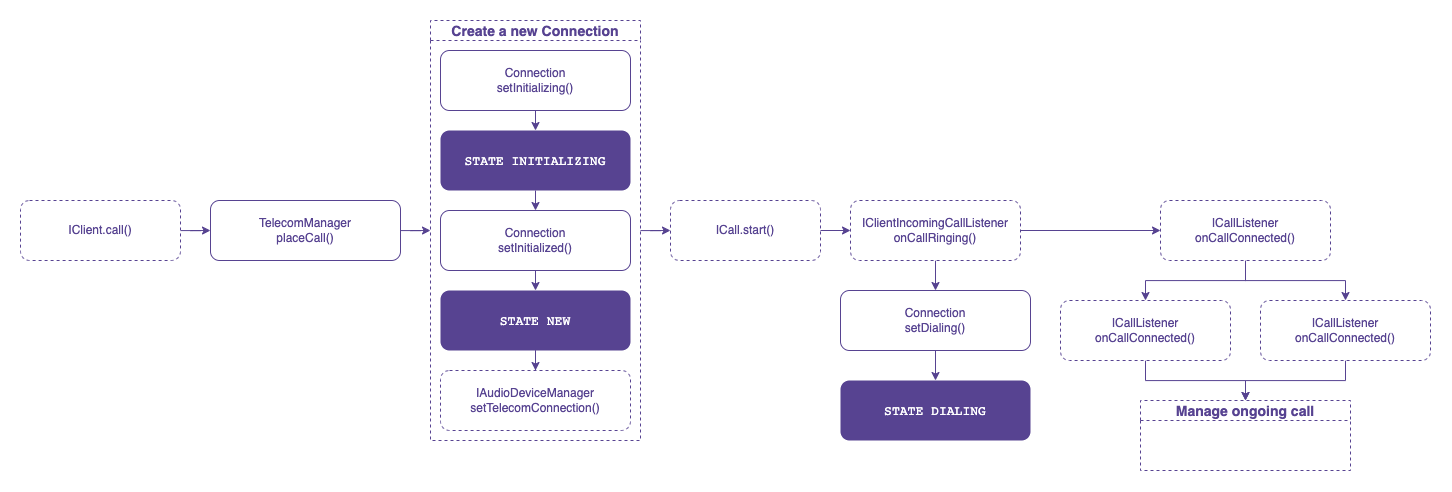
This definition necessitates the creation of a new Android Telecom Connection for each outgoing (before `ICall.start()`) and incoming (before `ICall.answer()`) Voximplant call. This ensures that the Voximplant ICall interface manages a VoIP call, and the Telecom Connection registers this call within the telecom subsystem.
Every self-managed **Connection** should be specified with the following parameters:
```kotlin title="Self-managed Connection parameters"
connectionProperties = PROPERTY_SELF_MANAGED
audioModeIsVoip = true
```
You can also utilize additional features, such as placing a call on hold or muting it, using the **connectionCapabilities**. For a comprehensive list of features, refer to the [Android Developers](https://developer.android.com/reference/android/telecom/Connection) site.
Please note that each new `Connection` should be passed to the Voximplant SDK via `IAudioDeviceManager.setTelecomConnection()` to manage audio devices.
If a non-null Telecom `Connection` is provided via `IAudioDeviceManager.setTelecomConnection()`, the audio focus is managed by the Android Telecom framework. In this case, the Voximplant SDK does not request audio focus on its own, and `IAudioFocusChangeListener.onAudioFocusChange(int)` is not triggered. `IAudioFocusChangeListener.onAudioFocusChange(int)` is triggered only when the Voximplant SDK manages the audio focus by itself.
### Make an outgoing call
To initiate an outgoing call, ensure that a **PhoneAccount** is registered and then utilize the `TelecomManager.placeCall()` method.
A self-managed **ConnectionService** should contain `EXTRA_PHONE_ACCOUNT_HANDLE` in the Bundle extra to specify the **PhoneAccountHandle** associated with it.
If the app can place an outgoing call, the telecom subsystem calls the `onCreateOutgoingConnection()` method where the app should return a new **Connection** to represent a new outgoing call.
It is important to call `Connection.setActive()` once the outgoing call is connected. It notifies the telecom subsystem that the call is in progress.
### Receive an incoming call
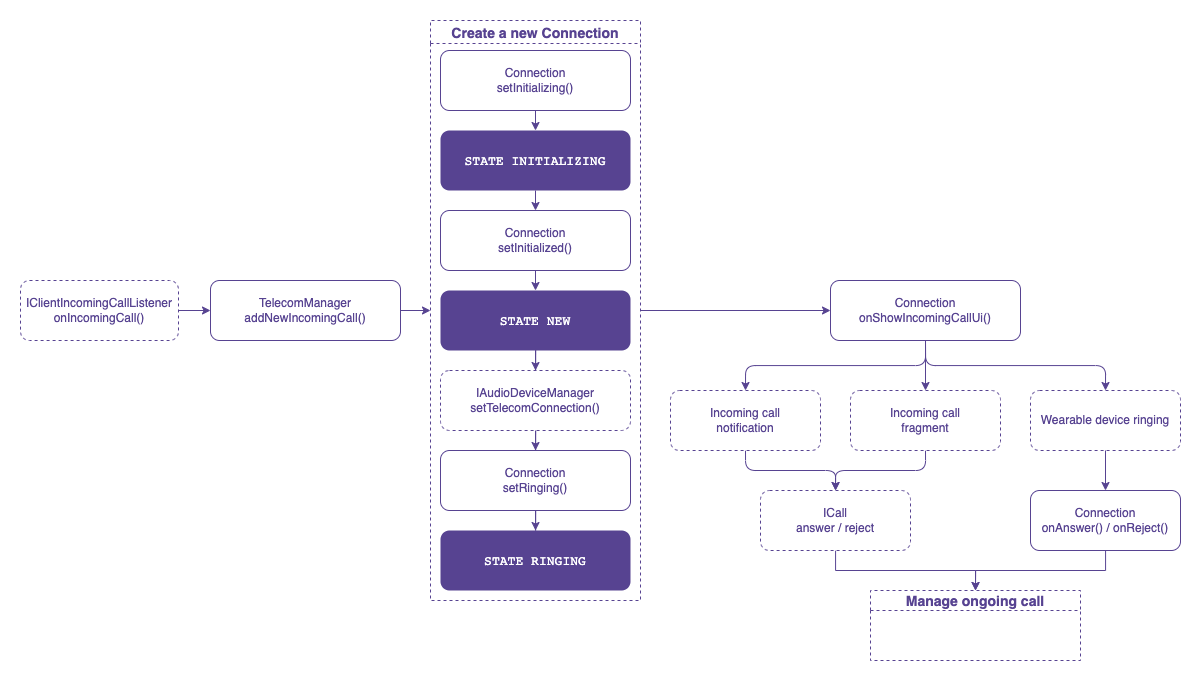
When the app receives an incoming call via the Voximplant SDK (`IClientIncomingCallListener.onIncomingCall()`), it is necessary to check the **PhoneAccount** registration in the system. To register a new incoming call, use the `TelecomManager.addNewIncomingCall()` method.
The telecom subsystem binds to the app's **ConnectionService** and requests a new **Connection** instance for the incoming call via the `ConnectionService.onCreateIncomingConnection()` API. Upon receiving this event, the application needs to create a **Connection**.
For a self-managed connection service, the **Connection** triggers the `Connection.onShowIncomingCallUi()` event to let the application know when to display the incoming call UI. Showing a notification with full-screen intent is recommended.
The user may accept and reject the incoming call from the incoming call notification or wearable devices:
* If the user answers or rejects the call from the notification, it should be handled by the application via PendingIntent.
* If the user answers or rejects the call from a wearable device, the **Connection** informs you about this action by triggering the `Connection.onAnswer()` or `Connection.onReject()` event.
To answer the call, you need the `ICall.answer()` API. Establish the call connection via the Voximplant Android SDK and update the **Connection** state to active once the call is connected (`ICallListener.onCallConnected()`).
To reject the call, you need the `ICall.reject()` API. The Voximplant Android SDK triggers the `ICallListener.onCallDisconnected()` event as soon as the call is ended. The application should set the **Connection** status to disconnected and destroy the **Connection**.
### Manage ongoing call
The Voximplant Android SDK offers the following capabilities for ongoing calls:
* Put the call on hold
* Mute
* Change the audio device
The Voximplant Android SDK fully manages the mute and audio device changing capabilities, eliminating the need for any **Connection** API call.
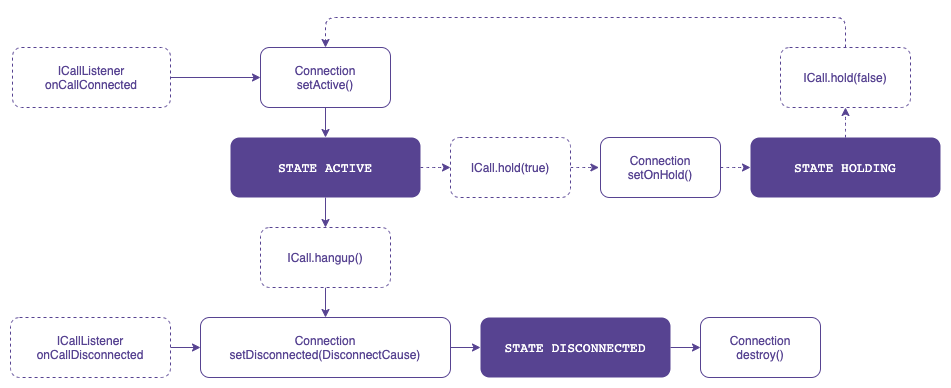
To put the call on hold, the application’s **Connection** state should be changed using the `Connection.setOnHold()` API. However, ensure that `ICall.hold()` is completed successfully before changing the **Connection** state.
```kotlin title="Change the status to put on hold"
call?.hold(hold, object : ICallCompletionHandler {
override fun onComplete() {
if (hold) {
callConnection?.setOnHold()
} else {
callConnection?.setActive()
}
}
override fun onFailure(e: CallException) {}
})
```
1. On devices running Android API level 28 or higher, when an incoming PSTN call is answered by the user, the VoIP ongoing call is put on hold by **TelecomManager** and can be resumed after the PSTN call ends. On devices running Android API level 27 or lower, only one app can maintain an ongoing call at any given time. This constraint means that the ongoing call is terminated.
### End ongoing call
Either a user or a remote party can end an ongoing call.
If the user ends the call, the application should call the `ICall.hangup()` API, so the Voximplant Android SDK triggers the `ICallListener.onCallDisconnected()` event.
If the remote party ends the call, the Voximplant Android SDK informs the application by triggering the `ICallListener.onCallDisconnected()` event.
After receiving the `ICallListener.onCallDisconnected()` event, you need to:
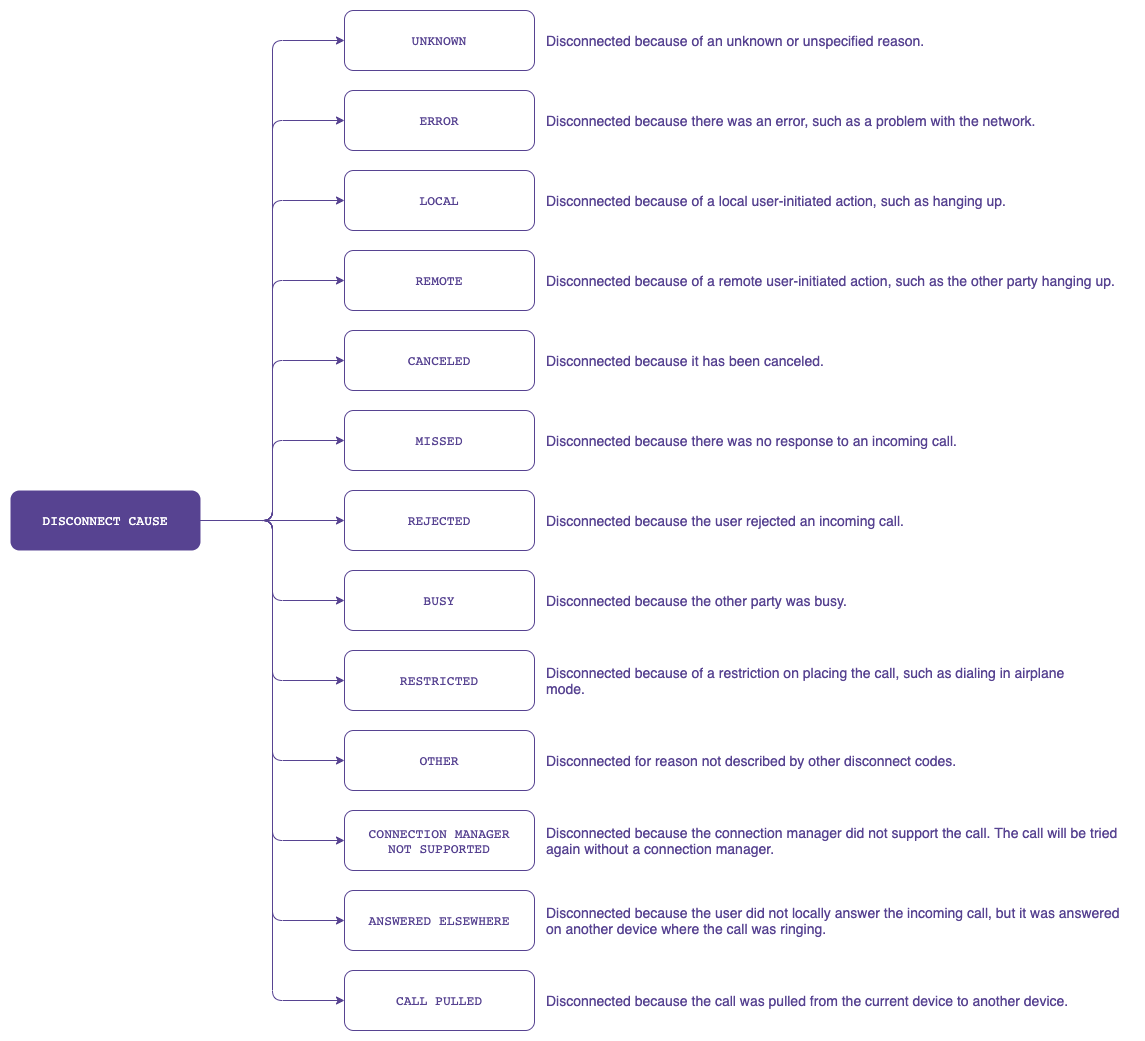
1. Change the **Connection** status to disconnected via the `Connection.setDisconnected(DisconnectCause)` API.
2. Destroy the **Connection** via the `Connection.destroy()` API to destroy the Connection object.
**DisconnectCause** describes the cause of a disconnected call. It always includes a code describing the generic cause of the disconnect. Optionally, it may include a label and/or description to be displayed to the user. The **ConnectionService** provides localized versions of the label and description. It may also contain a disconnect reason used for the logs, and not intended for the user.
See **DisconnectCause** on the [Android Developers](https://developer.android.com/reference/android/telecom/DisconnectCause) site for more information.