> For a complete documentation index, fetch https://docs.voximplant.ai/llms.txt

# Pipeline Options

<blockquote>
  For the complete documentation index, see <a href="/llms.txt">llms.txt</a>.
</blockquote>

VoxEngine supports a wide variety of Voice AI architectures and components.
The right pipeline depends on your priorities -- low latency, interactivity needs, voice choice, and low-level control are some factors to consider.

<div>
  <a href="#speech-to-speech">
    <p>
      <em>User↔LLM</em>
    </p>

    <h3>
      Speech-to-speech (S2S)
    </h3>

    <p>
      Fully integrated Voice AI that often offers the lowest overall latency.
    </p>

    <span>
      Fastest path | Lowest latency
    </span>
  </a>

  <a href="#hybrid-cascade">
    <p>
      <em>LLM↔TTS</em>
    </p>

    <h3>
      Hybrid-cascade
    </h3>

    <p>
      Realtime LLM for speech input and reasoning, with a separate TTS system for output voice.
    </p>

    <span>
      More voice choice | Still realtime
    </span>
  </a>

  <a href="#full-cascade">
    <p>
      <em>STT↔LLM↔TTS</em>
    </p>

    <h3>
      Cascaded
    </h3>

    <p>
      Separate STT, LLM, and TTS stages for maximum provider flexibility and pipeline control.
    </p>

    <span>
      Most configurable | Most complex
    </span>
  </a>
</div>

## High-level comparison

| Pipeline         | Best when you want                       | Latency | Voice flexibility                            | Provider flexibility | VoxEngine control |
| ---------------- | ---------------------------------------- | ------- | -------------------------------------------- | -------------------- | ----------------- |
| Speech-to-speech | Streamlined architecture                 | Lowest  | Limited to the realtime provider voice stack | Medium               | Medium            |
| Hybrid-cascade   | Realtime LLM with external TTS           | Low     | High                                         | High for TTS-only    | High              |
| Cascaded         | Independent control of STT, LLM, and TTS | Higher  | High                                         | Highest              | Highest           |

<Note>
  Some vendors present a speech-to-speech (S2S) API externally, but internally manage a cascaded architecture with separate components with varying degrees of control and configuration.
  See more details below.
</Note>

<Tip>
  * Start with speech-to-speech when you want to get to a working voice agent quickly.
  * Move to hybrid-cascade when you need more TTS voice choices and control, and can tolerate some additional latency.
  * Consider full cascade when you need independent control over transcription, reasoning, playback, turn-taking, or
    provider mix and are willing to manage the additional interactions.
</Tip>

## Voximplant Connectors & Pipeline Support

Voximplant always manages the telephony side of the call: routing, answering, bridging media, call control, and any orchestration logic you add in VoxEngine.
Our Voice AI API clients - also referred to as connectors - provide a direct connection from VoxEngine to the provider's environment with a low-latency WebSocket connection.
Voximplant's various connector options differ in how they handle transcription, reasoning, and speech synthesis internally.

LLMs like OpenAI, Gemini, and Grok provide direct access to the speech-enabled LLM.
Speech input and output parameters are managed as part of the connector.

Ultravox provides a speech-native LLM, but integrates TTS within their environment, only exposing a Speech-to-Speech interface to Voximplant.
Similarly, ElevenLabs, Cartesia, and Deepgram provide a speech-to-speech interface to Voximplant, but handle LLM, STT, and TTS elements internally.
Configuration of these internal elements vary by vendor. We refer to the integrations as "indirect speech-to-speech".

All vendors provide some level of end-of-turn detection, with some vendors providing more explicit control over turn-taking and barge-in.

The table below summarizes support by vendor from the Voximplant connector perspective.

| Agent Vendor                                                      | Direct S2S | Indirect S2S | Hybrid | Cascaded |
| ----------------------------------------------------------------- | ---------- | ------------ | ------ | -------- |
| [OpenAI](/voice-ai-orchestration/openai/overview)                 | ✓          |              | ✓      | ✓        |
| [Gemini Live](/voice-ai-orchestration/gemini/overview)            | ✓          |              |        |          |
| [xAI Grok Voice Agent](/voice-ai-orchestration/grok/overview)     | ✓          |              |        |          |
| [Ultravox](/voice-ai-orchestration/ultravox/overview)             |            | ✓            |        |          |
| [ElevenLabs Agents](/voice-ai-orchestration/elevenlabs/overview)  |            | ✓            |        |          |
| [Deepgram Agents](/voice-ai-orchestration/deepgram/overview)      |            | ✓            |        |          |
| [Cartesia Line Agents](/voice-ai-orchestration/cartesia/overview) |            | ✓            |        |          |

## Speech-to-speech

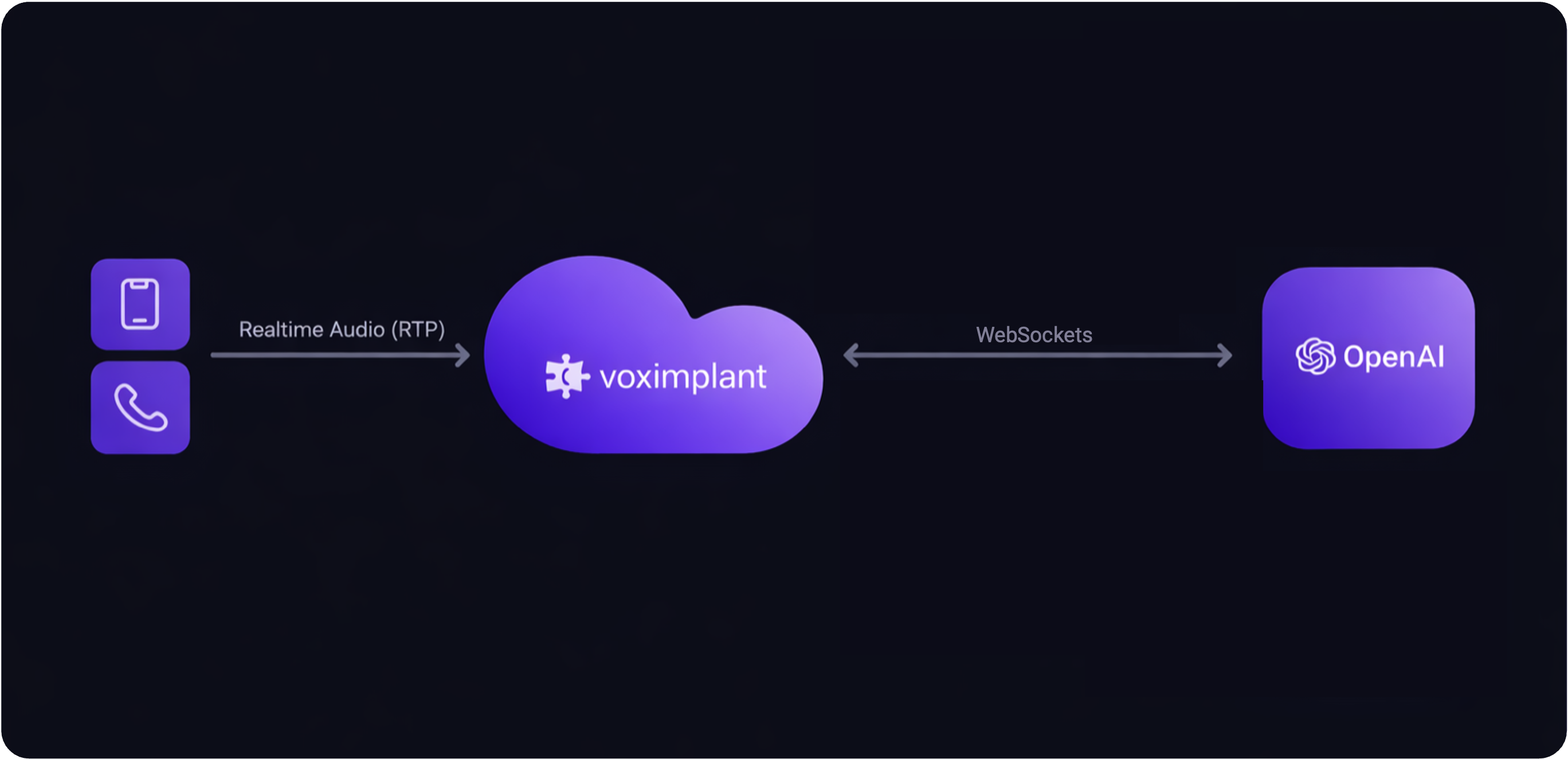
In this pattern, caller audio is bridged to the provider in realtime, and the provider returns speech audio directly back into the call.

<div>
  <img src="https://files.buildwithfern.com/voximplant.docs.buildwithfern.com/06c6fa34c3e2907c70fc10eaee58b887dc70fe302f6b2ad455bc8dd337fe4cac/docs/assets/connectors/s2s-light.png" alt="Speech-to-speech architecture in light mode" />

  <img src="https://files.buildwithfern.com/voximplant.docs.buildwithfern.com/4bfae36e253eb1a3938f294667501aca9326192cbc1b6f42ed9920f0c0c688b8/docs/assets/connectors/s2s-dark.png" alt="Speech-to-speech architecture in dark mode" />
</div>

### How it works

* Caller audio is streamed from VoxEngine to a realtime voice agent over WebSockets.
* The provider handles speech recognition, reasoning, and speech generation in one session.
* VoxEngine manages telephony, routing, media bridge, and call control around that session.

### Tradeoffs

<div>
  <div>
    <h4>
      Advantages
    </h4>

    <ul>
      <li>
        Lowest end-to-end latency.
      </li>

      <li>
        Simple architecture with fewer systems to coordinate.
      </li>

      <li>
        Fastest path from prototype to production trial.
      </li>

      <li>
        Natural fit for direct realtime connectors with built-in streaming speech.
      </li>
    </ul>
  </div>

  <div>
    <h4>
      Disadvantages
    </h4>

    <ul>
      <li>
        Voice quality and speech style are limited to the provider's native output voices.
      </li>

      <li>
        You have less control over how STT, reasoning, and speech output are separated.
      </li>

      <li>
        Switching one stage often means switching the whole stack.
      </li>
    </ul>
  </div>
</div>

### Best for

* You want the fastest possible conversational loop.
* You are happy with the provider's built-in voices.
* You want the simplest operational model.

### Related guides

#### Direct speech-to-speech connectors

These connectors expose the speech-enabled LLM directly to VoxEngine.

<div>
  <a href="/voice-ai-orchestration/openai/overview">
    <h3>
      OpenAI
    </h3>

    <p>
      Direct realtime speech-to-speech with OpenAI.
    </p>
  </a>

  <a href="/voice-ai-orchestration/gemini/overview">
    <h3>
      Gemini Live
    </h3>

    <p>
      Direct live audio pipeline with Gemini Live.
    </p>
  </a>

  <a href="/voice-ai-orchestration/grok/overview">
    <h3>
      xAI Grok Voice Agent
    </h3>

    <p>
      Realtime voice interaction with Grok voice agent sessions.
    </p>
  </a>
</div>

#### Indirect speech-to-speech connectors

These connectors present a speech-to-speech interface to VoxEngine while managing more of the internal speech and agent stack inside the provider environment.

<div>
  <a href="/voice-ai-orchestration/ultravox/overview">
    <h3>
      Ultravox
    </h3>

    <p>
      Speech-native realtime agent with native speech input and output.
    </p>
  </a>

  <a href="/voice-ai-orchestration/elevenlabs/overview">
    <h3>
      ElevenLabs Agents
    </h3>

    <p>
      Conversational agent sessions with realtime speech handling.
    </p>
  </a>

  <a href="/voice-ai-orchestration/deepgram/overview">
    <h3>
      Deepgram Agents
    </h3>

    <p>
      Realtime voice agent flow with Deepgram speech input and output.
    </p>
  </a>

  <a href="/voice-ai-orchestration/cartesia/overview">
    <h3>
      Cartesia Line Agents
    </h3>

    <p>
      Speech-to-speech agent flow with Cartesia-managed runtime behavior.
    </p>
  </a>
</div>

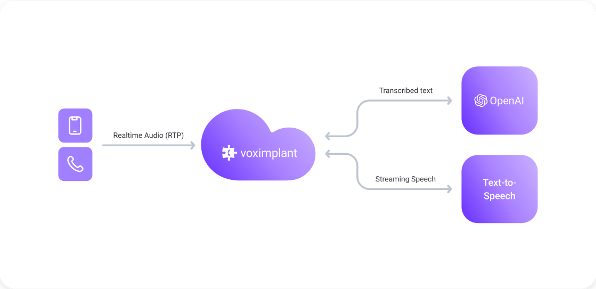
## Hybrid-cascade

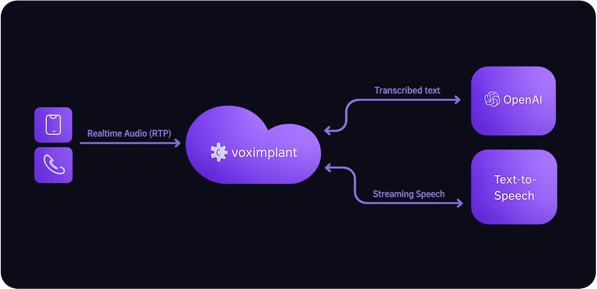
Hybrid-cascade - sometimes called half-cascade - keeps the realtime LLM in the loop for user speech input and reasoning, but moves speech output to a separate synthesis provider.
This is often the best compromise between latency and voice flexibility.

<div>
  <img src="https://files.buildwithfern.com/voximplant.docs.buildwithfern.com/023442b4007585055cb0163e006064d9ed84cae7ea7d02b8c856cad4401a2b83/docs/assets/connectors/half-cascade-light.png" alt="Half-cascade architecture in light mode" />

  <img src="https://files.buildwithfern.com/voximplant.docs.buildwithfern.com/705b77ca97365bdf8a084a09a651d73efcefd6315ea6c3d451ebbc1577b46447/docs/assets/connectors/half-cascade-dark.png" alt="Half-cascade architecture in dark mode" />
</div>

### How it works

* Caller audio is streamed to a realtime LLM.
* The realtime LLM returns text rather than audio (or you transcribe the audio).
* VoxEngine sends the text into a TTS engine and streams the generated speech back to the caller.

### Tradeoffs

<div>
  <div>
    <h4>
      Advantages
    </h4>

    <ul>
      <li>
        Much broader choice of output voices and TTS providers.
      </li>

      <li>
        Lets you tune speaking style, voice identity, and output pricing separately from the LLM.
      </li>

      <li>
        Still supports low-latency streaming when paired with realtime TTS.
      </li>

      <li>
        Good balance between orchestration control and implementation simplicity.
      </li>
    </ul>
  </div>

  <div>
    <h4>
      Disadvantages
    </h4>

    <ul>
      <li>
        More moving parts than direct speech-to-speech.
      </li>

      <li>
        Output latency depends on the selected TTS provider and playback strategy.
      </li>

      <li>
        Increased cost - you need to pay for realtime LLM and speech synthesis.
      </li>
    </ul>
  </div>
</div>

### Best for

* You want a specific voice provider or voice quality that your LLM provider does not offer.
* You want more control over output speech without moving to a full cascade.
* You need a practical middle ground between speed and flexibility.

### Related guides

<div>
  <a href="/voice-ai-orchestration/openai/half-cascade-cartesia">
    <h3>
      OpenAI + Cartesia
    </h3>

    <p>
      Realtime LLM with Cartesia realtime TTS.
    </p>
  </a>

  <a href="/voice-ai-orchestration/openai/half-cascade-elevenlabs">
    <h3>
      OpenAI + ElevenLabs
    </h3>

    <p>
      Realtime LLM with ElevenLabs streaming TTS.
    </p>
  </a>

  <a href="/voice-ai-orchestration/openai/half-cascade-inworld">
    <h3>
      OpenAI + Inworld
    </h3>

    <p>
      Realtime LLM with Inworld speech output.
    </p>
  </a>
</div>

## Full cascade

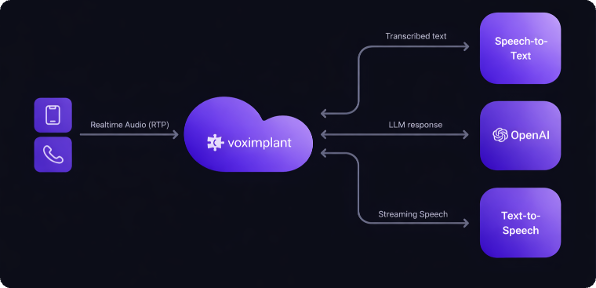
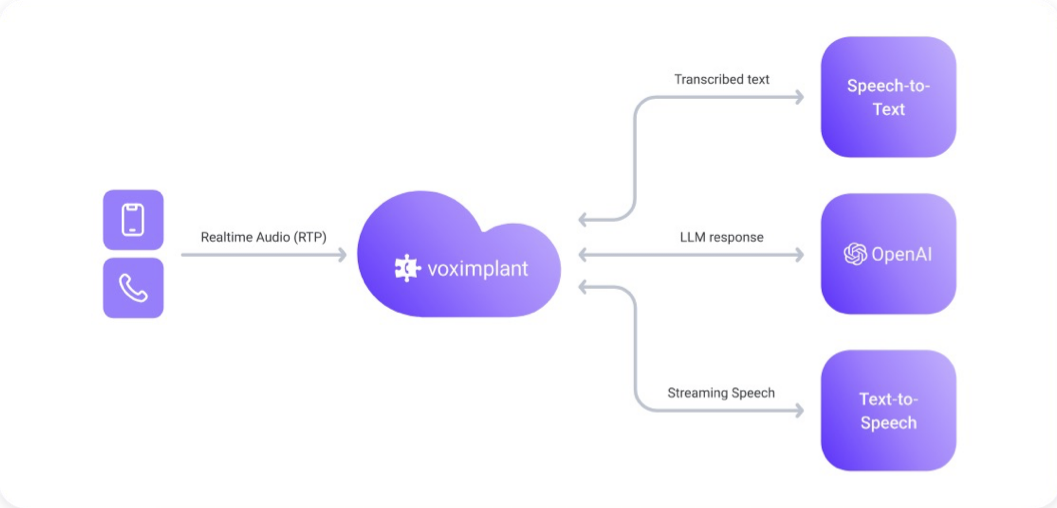
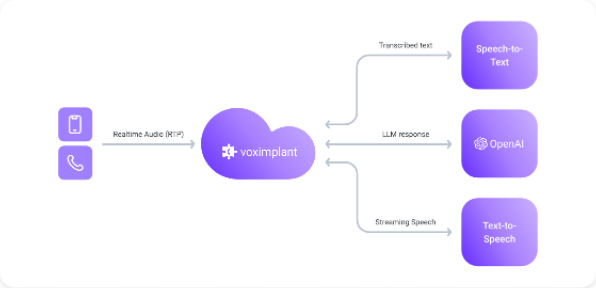
Full cascade separates speech-to-text, reasoning, and text-to-speech into independent stages. This gives you the most control over the pipeline and the most freedom to mix providers.

<div>
  <img src="https://files.buildwithfern.com/voximplant.docs.buildwithfern.com/b7909e251c9267ff49c41971ef232b01916748dd54dab9e517f01fbb725579ef/docs/assets/connectors/cascaded-light.png" alt="Full-cascade architecture in light mode" />

  <img src="https://files.buildwithfern.com/voximplant.docs.buildwithfern.com/a99eb42a89d407d8f66e5b2b81550304ab9948a495fafd77c3662a5144d9439e/docs/assets/connectors/cascaded-dark.png" alt="Full-cascade architecture in dark mode" />
</div>

### How it works

* VoxEngine transcribes caller audio with an STT integration.
* Your scenario sends text to an LLM or OpenAI-compatible endpoint.
* The text response is synthesized through a TTS provider and streamed back into the call.
* Voice activity detection, turn detection, and barge-in control are handled explicitly in the orchestration layer.

### Tradeoffs

<div>
  <div>
    <h4>
      Advantages
    </h4>

    <ul>
      <li>
        Maximum freedom to choose the best STT, LLM, and TTS provider for each stage.
      </li>

      <li>
        Strong control over turn-taking, interruption logic, and prompt/response handling.
      </li>

      <li>
        Works well when you need custom transcription behavior, domain vocabulary, or provider-specific tuning.
      </li>

      <li>
        Easier to swap one layer without redesigning the whole pipeline.
      </li>
    </ul>
  </div>

  <div>
    <h4>
      Disadvantages
    </h4>

    <ul>
      <li>
        Highest implementation and operational complexity.
      </li>

      <li>
        More places to manage latency and streaming coordination.
      </li>

      <li>
        Requires deliberate turn-taking and barge-in handling for a natural caller experience.
      </li>
    </ul>
  </div>
</div>

### Best for

* You need full control over transcription, reasoning, and speech generation.
* You want to mix providers based on quality, language support, or cost.
* You need explicit turn-taking logic or custom orchestration around the LLM.

### Related guides

For turn-taking, interruption, and end-of-turn behavior, see the [Speech Flow Control guides](/voice-ai-orchestration/speech-flow-control/).

<div>
  <a href="/voice-ai-orchestration/openai/full-cascade-groq">
    <h3>
      Full-cascade incl. Groq
    </h3>

    <p>
      Independent STT, LLM, and TTS with explicit turn-taking.
    </p>
  </a>

  <a href="/voice-ai-orchestration/speech-flow-control/turn-taking-helper-library">
    <h3>
      Turn Taking Helper Library
    </h3>

    <p>
      Reference guide for VAD, turn detection, and barge-in orchestration.
    </p>
  </a>

  <a href="/getting-started/enhance-and-deploy/telephony-and-voice-ai#run-text-to-speech-in-voxengine">
    <h3>
      Run TTS in VoxEngine
    </h3>

    <p>
      Related guide for playback and TTS orchestration patterns.
    </p>
  </a>
</div>

## Choosing a pipeline

If you are new to Voice AI starting from scratch, we recommend the following progression:

1. Start with speech-to-speech to validate the call flow and prompt design quickly.
2. Move to hybrid-cascade if you need a different voice or output speech behavior than your speech-LLM provider offers.
3. Move to full cascade when you need full provider selection, explicit turn-taking control, and/or custom orchestration between stages.

That progression keeps the first version simple while leaving room to add flexibility only when the product requirements justify the extra moving parts.