

Overview
Deepgram Voice Agent in VoxEngine
For the complete documentation index, see llms.txt.
Benefits
The native Deepgram module connects any Voximplant call to Deepgram’s Voice Agent API for real-time, speech‑to‑speech conversations. The integration supports bi-directional audio from phone numbers, SIP trunks, WhatsApp, or WebRTC into Deepgram’s unified agent environment (STT + LLM + TTS) and play responses via Voximplant’s serverless runtime with minimal latency.
Capability and feature highlights:
- Delivered as a Voice AI Connector inside VoxEngine: you define Deepgram STT, LLM, and TTS parameters; Voximplant handles telephony, media conversion, and streaming WebSockets.
- Fully exposes Deepgram speech recognition, a wide variety of LLM models, and speech synthesis options from Deepgram and partners.
- Bridge PSTN, SIP, WebRTC, or WhatsApp calls into Deepgram Voice Agent using a single VoxEngine scenario.
- Keep conversations natural with low-latency turn‑taking and barge‑in.
- Apply and update agent configuration mid-call.
- Subscribe to Voice Agent events (for example
AgentThinkingandHistory). - Handle function calls for external integrations.
Demo video
Deepgram Voice Agent on Voximplant: Enterprise-ready Voice AI Phone Calls with Context Memory
Video link: Deepgram Voice Agent on Voximplant
Architecture
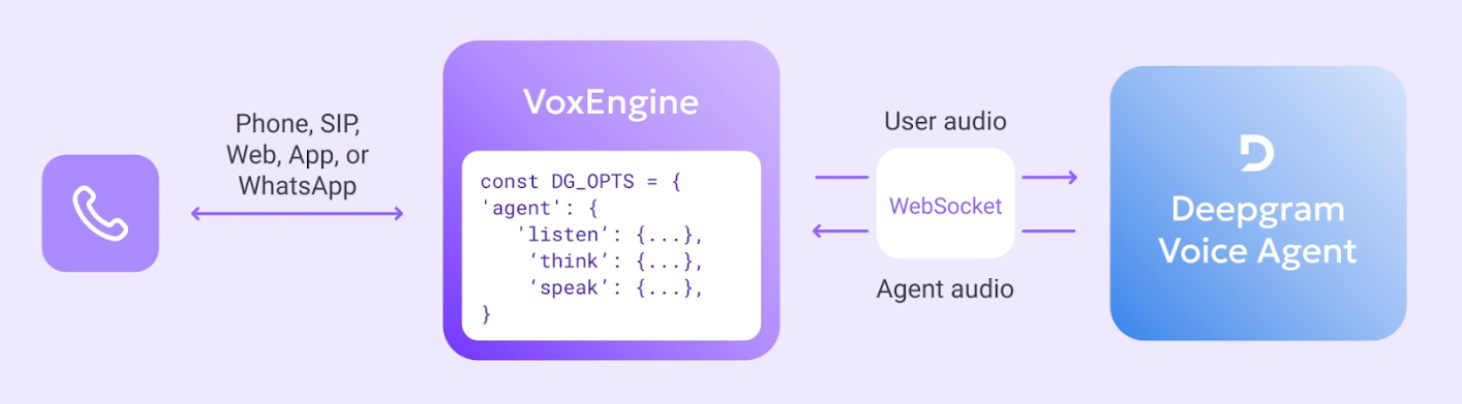
Prerequisites
- Deepgram account in the Deepgram console (create one at signup if needed).
- Deepgram API key from the Deepgram console.
Development notes
- Native VoxEngine module: load with
require(Modules.Deepgram)and create aDeepgram.VoiceAgentClientviaDeepgram.createVoiceAgentClient(...). - Session setup: pass Deepgram’s Voice Agents settings object to specify
agent.listen(STT),agent.think(LLM), andagent.speak(TTS). Do not includeaudiosettings — these are hardcoded by the connector for optimum voice quality with Voximplant. - Events: all Deepgram Voice Agent events are supported under the
Deepgram.VoiceAgentEventsenum. Subscribe to events such asConversationText,AgentThinking,Warning,Error, andHistory. VoxEngine also providesWebSocketMediaStartedandWebSocketMediaEndedfor debugging media flow. - Mid-session updates: update without reconnecting using
sendUpdatePromptandsendUpdateSpeak. Inject text withsendInjectUserMessageandsendInjectAgentMessage. - Function calling: define tools in Deepgram’s
think.functionsarray; handle requests viaDeepgram.VoiceAgentEvents.FunctionCallRequestand respond withFunctionCallResponse. - Barge‑in: listen for
Deepgram.VoiceAgentEvents.UserStartedSpeakingand callvoiceAgentClient.clearMediaBuffer()to cancel current TTS audio when the user interrupts. - Deepgram ASR is a different module: this connector is independent of VoxEngine’s existing Deepgram ASR module (
VoxEngine.createASR). You can align ASR parameters with your Voice Agentlistenconfiguration for consistent transcription before/after the agent is invoked.
See the Deepgram module API reference for full details on methods, events, and types and the examples in this section for usage.
Examples
- Example: Answering an incoming call
- Example: Placing an outbound call
- Example: Function calling
- Example: Context history with ApplicationStorage
Links
Voximplant
- Deepgram Voice AI Connector overview: https://voximplant.com/products/deepgram-client
- Deepgram Voice Agent getting started guide: https://voximplant.com/docs/voice-ai/deepgram/voice-agent-api-client
- Deepgram module API reference: https://voximplant.com/docs/references/voxengine/deepgram
- Voice AI product overview: https://voximplant.ai/
Deepgram
- Voice Agent API docs: https://developers.deepgram.com/docs/voice-agent