Overview
Cartesia Line Agents in VoxEngine
Benefits
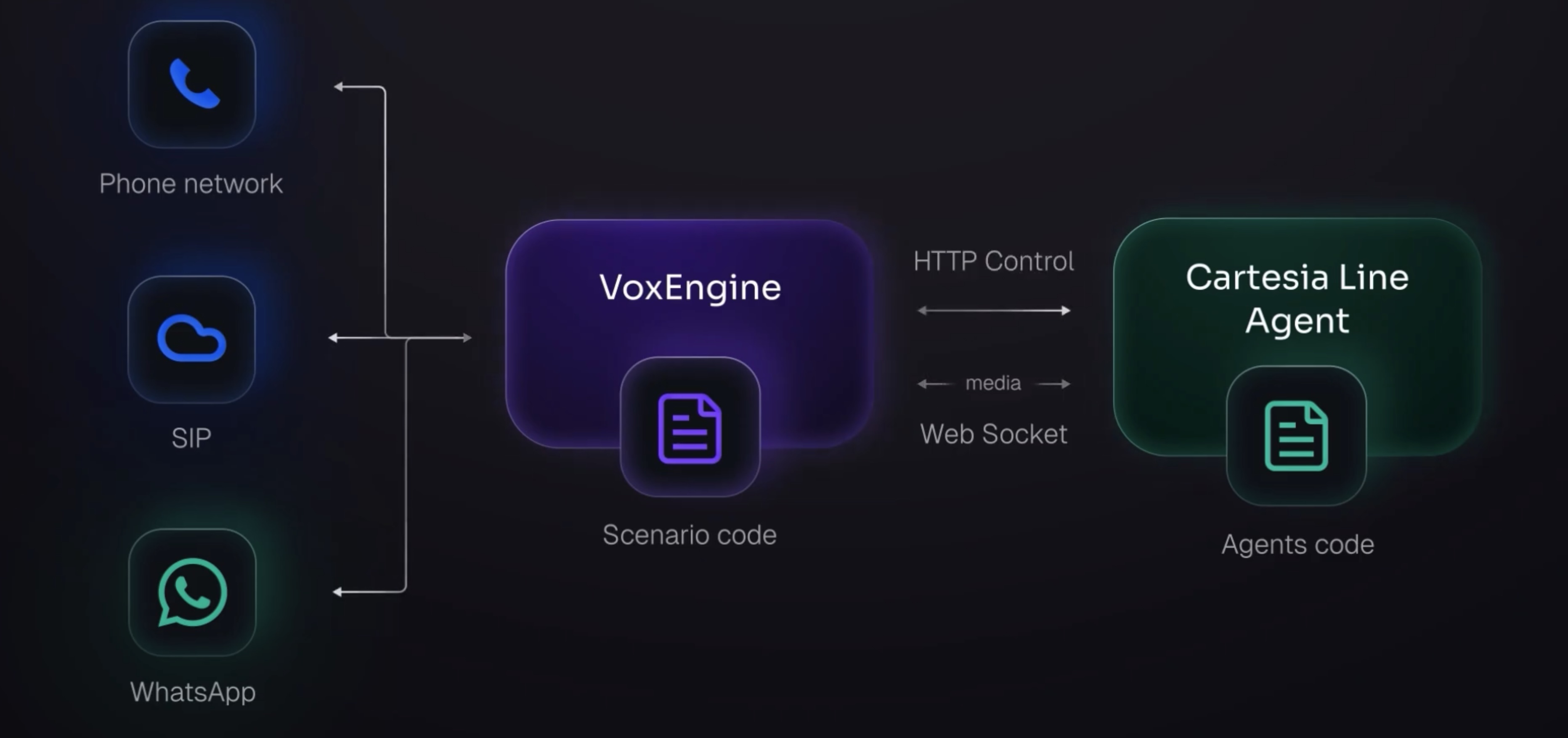
The native Cartesia module connects Voximplant calls to Cartesia Line Agents for real-time, speech-to-speech conversations. This allows one agent design to power calls across SIP trunks, WhatsApp, PSTN numbers, and app users while VoxEngine keeps call routing and control.
Capability and feature highlights:
- Connect inbound and outbound calls to one Cartesia Line Agent
- Bi-directional media streaming with telephony-ready audio format support
- Barge-in support via clear events and media buffer control
- Real-time agent events for ACK, custom metadata, DTMF, and diagnostics
Demo video
Cartesia Line Agents demo:
Architecture
Prerequisites
- Create a Cartesia Line Agent in the Cartesia Voice Agents portal
- Cartesia API key from the Cartesia Platform portal
- Cartesia agent ID from the Cartesia Voice Agents portal
- Inbound or outbound routing configured in Voximplant - see our getting started guides and the walkthrough video above for details.
Development notes
- Native VoxEngine module: load
require(Modules.Cartesia)and create aCartesia.AgentsClientviaCartesia.createAgentsClient({ apiKey, agentId, cartesiaVersion, ... }). - Line Agent → VoxEngine coordination: handle
AppEvents.HttpRequestin your scenario to processPOSTmessages sent by your Cartesia Line script for tool-call orchestration and routing decisions. - VoxEngine → Line Agent configuration: pass telephony context and callback endpoints to Line using the
metadataobject inclient.start({ ... })so the agent can request out-of-band actions from VoxEngine. - Barge-in and turn-taking: interruption behavior between caller/callee and the agent is managed by the Line Agent runtime; no additional VAD or turn-taking configuration is required in VoxEngine.
- Telephony tools for Voximplant-controlled routing: Line built-ins like
end_callandtransfer_callare designed for Line-native calling flows. For Voximplant-owned flows (warm transfer, SIP handoff, post-call survey), define passthrough tools in Line that signal VoxEngine out-of-band, then execute the telephony action in VoxEngine.
The Function Calling example demonstrates how to use the HTTP callback pattern for Line → VoxEngine control. See the Cartesia module API reference for all methods and events.
Examples
Links
Voximplant
- Cartesia Line Agents client product page: https://voximplant.com/products/cartesia-agents-client
- Cartesia module API reference: https://voximplant.com/docs/references/voxengine/cartesia
- Voice AI product overview: https://voximplant.ai/
Cartesia
- Cartesia Line docs: https://docs.cartesia.ai/line
- Cartesia CLI deployment: https://docs.cartesia.ai/line/cli
- Web calls integration: https://docs.cartesia.ai/line/integrations/web-calls
