Example: Function calling

View as MarkdownOpen in Claude

This example answers an inbound call, connects it to Cartesia Line Agents, and uses an HTTP callback for tool actions (end_call, call_transfer).

Jump to the Full VoxEngine scenario.

Prerequisites

  • Deploy a Cartesia Line Agent script that sends HTTP callbacks to VoxEngine for tool actions (see the Cartesia agent example).
  • Store your Cartesia API key in Voximplant ApplicationStorage under CARTESIA_API_KEY
  • Store your Cartesia Agent ID in Voximplant ApplicationStorage under CARTESIA_AGENT_ID
  • Ensure your scenario can place outbound PSTN calls with a verified caller ID (used by transfer) - see How can I enable Caller ID for outbound calls
  • Store a valid outbound caller ID in Voximplant ApplicationStorage under PSTN_CALLER_ID for transfer PSTN dialing

Session setup

This setup is similar to the inbound example, with one extra control-plane step for tools:

  1. AppEvents.Started: capture per-call accessSecureURL as sessionControlUrl.
  2. AppEvents.CallAlerting: answer the inbound call and (optionally) start recording.
  3. Create Cartesia.AgentsClient from ApplicationStorage.
  4. Bridge media between caller leg and Cartesia.
  5. Start Cartesia session with any metadata to pass to the agent, including vox_session_control_url.

Functional Call Execution

Architecture

Cartesia Line Agent currently provides limited controls over its WebSocket interface. Instead, we will use VoxEngine’s AppEvents.HttpRequest as a callback endpoint for the Cartesia Agent to request telephony actions (call transfer, hang up) in VoxEngine. This allows the Line Agent to orchestrate complex call control flows while VoxEngine retains ownership of telephony actions and routing decisions.
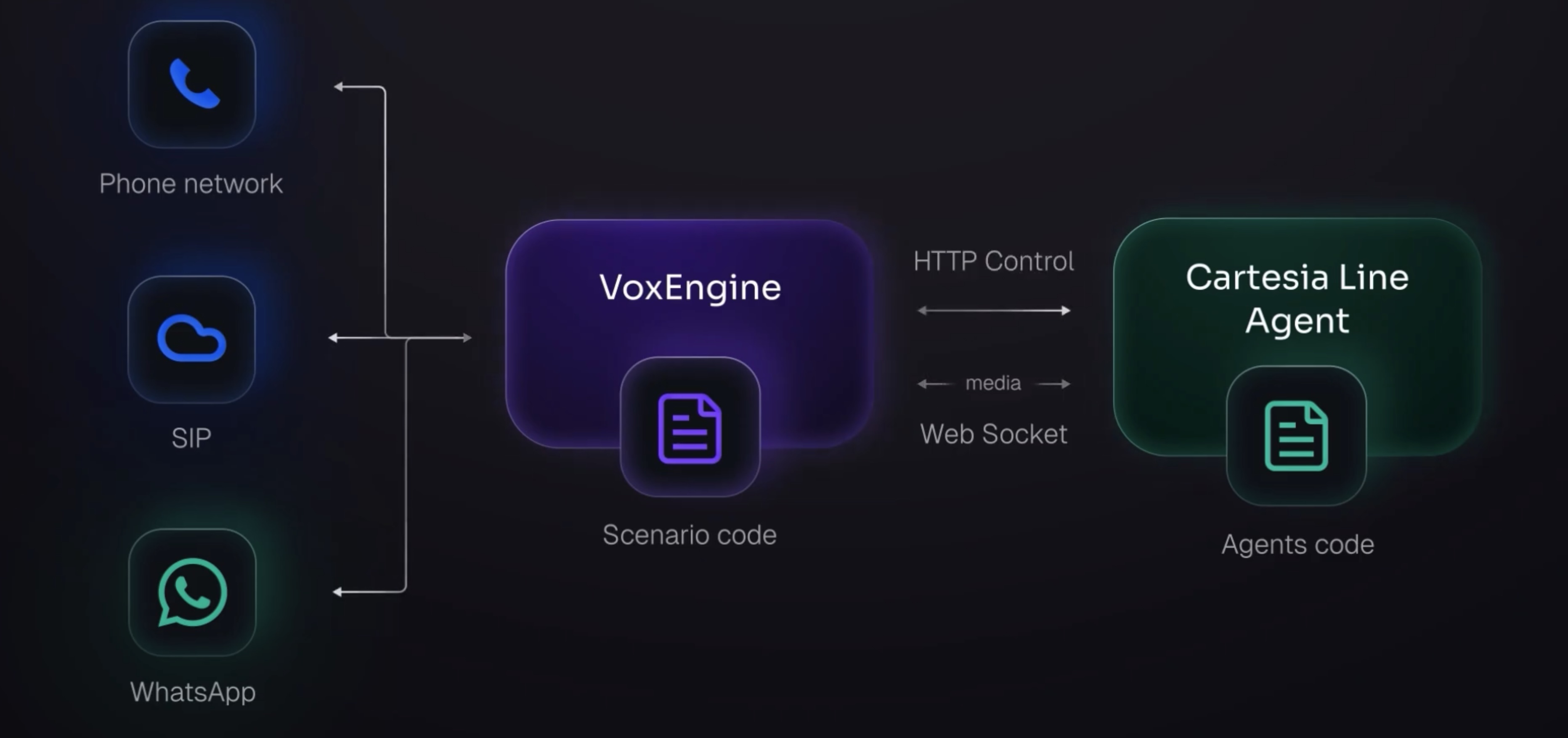
Cartesia Line Agents architecture

HTTP control model

This scenario uses the following control-plane pattern:

  1. VoxEngine gets a unique accessSecureURL in AppEvents.Started.
  2. VoxEngine passes that URL to Cartesia in metadata.vox_session_control_url.
  3. Cartesia Python tool handlers POST actions such as {"action":"end_call"} or {"action":"call_transfer"}.
  4. VoxEngine receives those requests in AppEvents.HttpRequest and executes telephony actions.

How AppEvents.HttpRequest is used

AppEvents.HttpRequest is the handoff point where Cartesia tool decisions become telephony actions:

  1. Cartesia sends an HTTPS POST to the per-call vox_session_control_url.
  2. VoxEngine receives request content in appEvent.content.
  3. Scenario parses JSON and switches on cmd.action.
  4. Scenario executes telephony action (hangup, callTransfer, bridge).
  5. Scenario returns a JSON string response ({"ok": true}) to acknowledge receipt.

Expected request payloads:

  • {"action":"end_call"}
  • {"action":"call_transfer","summary":"optional short summary"}

Minimal response payload:

  • {"ok": true}

Passing the control URL and metadata to Cartesia

Here we pass information such as the control URL to Cartesia when we start the session.

Session control URL + start metadata
1VoxEngine.addEventListener(AppEvents.Started, (appEvent) => {
2 sessionControlUrl = appEvent.accessSecureURL;
3});
4
5voiceAIClient.start({
6 metadata: {
7 from: call.callerid(),
8 to: call.number(),
9 vox_session_control_url: sessionControlUrl
10 }
11});

Handling control actions in AppEvents.HttpRequest

HTTP control handler
1VoxEngine.addEventListener(AppEvents.HttpRequest, (appEvent) => {
2 const cmd = JSON.parse(appEvent.content);
3 if (cmd.action === "end_call") {
4 callerLeg.hangup();
5 voiceAIClient?.close();
6 VoxEngine.terminate();
7 } else if (cmd.action === "call_transfer") {
8 callTransfer(cmd);
9 }
10 return JSON.stringify({ ok: true });
11});

High-level flows

Hang-up flow (end_call)

  1. Caller asks to end the call.
  2. Cartesia Python agent runs end_call() and posts {"action":"end_call"}.
  3. VoxEngine AppEvents.HttpRequest receives the action.
  4. Scenario hangs up caller leg, closes Cartesia websocket, and terminates the session.

Transfer flow (call_transfer)

  1. Caller asks to transfer to a human.
  2. Cartesia Python agent sends transfer confirmation, then posts {"action":"call_transfer","summary":"..."}.
  3. VoxEngine AppEvents.HttpRequest calls callTransfer(...).
  4. Scenario detaches caller from Cartesia (stopMediaBetween + websocket close), which makes this a blind transfer handoff pattern.
  5. Scenario dials consult PSTN call with VoxEngine.callPSTN(...) using PSTN_CALLER_ID.
  6. On consult answer, scenario bridges caller to consult leg with VoxEngine.sendMediaBetween(callerLeg, consultLeg).
  7. If consult call fails, scenario logs failure and hangs up caller leg.

Cartesia agent example (Python)

The full Cartesia Line Python agent example used with this callback pattern:

cartesia-line-tools-agent.py
1import os
2import asyncio
3from typing import Annotated, Optional
4
5import httpx
6
7from line.llm_agent import LlmAgent
8from line.llm_agent.config import LlmConfig
9from line.events import AgentEndCall, AgentSendText
10from line.llm_agent.tools.decorators import passthrough_tool
11from line.llm_agent.tools.utils import ToolEnv
12from line.voice_agent_app import AgentEnv, CallRequest, VoiceAgentApp
13
14
15DEFAULT_SYSTEM_PROMPT = """\
16You are a helpful voice agent running on Cartesia Line, connected to a phone call via Voximplant.
17
18This demo has a very simple call transfer:
191) If the caller asks for Voxy or a human, call call_transfer(summary=...).
202) The call_transfer tool will speak the transfer confirmation to the caller.
213) Do not continue the conversation after calling call_transfer.
22
23Ending the call:
24- If the caller asks to hang up or says goodbye, say a short goodbye and then call end_call().
25
26Be concise, polite, and ask one question at a time.
27"""
28
29DEFAULT_INTRODUCTION = "Hi, this is Voximplant Voice AI powered by Cartesia Line. How can I help?"
30
31
32async def _post_vox_control(
33 url: str,
34 payload: dict,
35 *,
36 timeout_s: float = 3.0,
37) -> dict:
38 """Send a POST request to the given URL with the provided payload."""
39 try:
40 async with httpx.AsyncClient(timeout=timeout_s) as client:
41 response = await client.post(url, json=payload)
42 try:
43 return response.json()
44 except Exception:
45 return {"status_code": response.status_code, "text": response.text}
46 except Exception:
47 return {"error": "request_failed"}
48
49
50async def get_agent(env: AgentEnv, request: CallRequest):
51 # Extract the Voximplant control URL from the request metadata, if present and valid.
52 vox_control_url: Optional[str] = None
53 if request.metadata and isinstance(request.metadata, dict):
54 raw = request.metadata.get("vox_session_control_url")
55 if isinstance(raw, str) and raw.startswith("https://"):
56 vox_control_url = raw
57
58 if not vox_control_url:
59 return {
60 "error": "missing_vox_control_url",
61 "message": "The call request is missing a valid 'vox_session_control_url' in its metadata.",
62 }
63
64 @passthrough_tool
65 async def call_transfer(
66 ctx: ToolEnv,
67 summary: Annotated[
68 str,
69 "Optional short transfer summary (for logs / analytics). Voximplant will receive it.",
70 ] = "",
71 ):
72 """Request Voximplant to transfer the call to a human (Voximplant performs the telephony actions).
73 Speak first so the caller reliably hears the transfer confirmation before Voximplant
74 detaches the agent audio and bridges to PSTN.
75 """
76 yield AgentSendText(text="Sure. One moment, I'm transferring you to a human now.")
77
78 async def _do_transfer():
79 # Give TTS time to play before Voximplant starts tearing down the agent bridge.
80 # use line.events.AgentTurnEnded to be more precise
81 await asyncio.sleep(5.0)
82 await _post_vox_control(
83 vox_control_url,
84 {"action": "call_transfer", "summary": summary},
85 timeout_s=10.0,
86 )
87
88 asyncio.create_task(_do_transfer())
89
90 @passthrough_tool
91 async def end_call(ctx: ToolEnv):
92 """End the call."""
93 yield AgentEndCall()
94 # Give TTS time to play before Voximplant starts tearing down the agent bridge.
95 # use line.events.AgentTurnEnded to be more precise
96 await asyncio.sleep(3.0)
97 await _post_vox_control(vox_control_url, {"action": "end_call"})
98
99 agent = LlmAgent(
100 model="gpt-5-nano",
101 api_key=os.getenv("OPENAI_API_KEY", ""),
102 tools=[end_call, call_transfer],
103 config=LlmConfig(
104 system_prompt=DEFAULT_SYSTEM_PROMPT, # use request.agent.system_prompt for the GUI version
105 introduction=DEFAULT_INTRODUCTION, # use request.agent.introduction for the GUI version
106 ),
107 )
108
109 return agent
110
111
112voice_agent_app = VoiceAgentApp(get_agent=get_agent)
113app = voice_agent_app.fastapi_app
114
115
116if __name__ == "__main__":
117 # Local dev only. Cartesia runs this as a web service in the cloud.
118 voice_agent_app.run()

This Python sample expects metadata.vox_session_control_url and uses it to call back into VoxEngine.

Notes

Voximplant

Cartesia

Full VoxEngine scenario

voxeengine-cartesia-tools.js
1// Voximplant VoxEngine scenario:
2// - Streams caller audio <-> Cartesia Line agent (Agents connector)
3// - Supports:
4// - end_call: hang up the caller leg
5// - call_transfer: place an outbound PSTN consult call and then bridge caller -> consult leg
6//
7// Configure these keys in Voximplant Application Storage:
8// - CARTESIA_API_KEY
9// - CARTESIA_AGENT_ID
10// - PSTN_CALLER_ID (required for callPSTN; must be a real E.164 number in your Voximplant account)
11
12require(Modules.Cartesia);
13require(Modules.ApplicationStorage);
14require(Modules.ASR);
15
16const CALL_TRANSFER_NUMBER = "+18339906144";
17
18// Per-session control URL. Any HTTPS request to this URL triggers AppEvents.HttpRequest in this session.
19// We'll pass it into Cartesia call metadata so the agent runtime can request telephony actions via HTTP.
20let sessionControlUrl = null;
21
22
23// Current call session state (single-call demo scenario).
24let callerLeg = null;
25let voiceAIClient = null;
26let consultLeg = null;
27let transferInProgress = false;
28let transferred = false;
29
30
31VoxEngine.addEventListener(AppEvents.Started, (appEvent) => {
32 sessionControlUrl = appEvent.accessSecureURL;
33 Logger.write(`===SESSION_CONTROL_URL_READY===>${JSON.stringify({accessSecureURL: sessionControlUrl}) || ""}`);
34});
35
36
37VoxEngine.addEventListener(AppEvents.HttpRequest, async (appEvent) => {
38 Logger.write(`===HTTP_CONTROL_REQUEST===>${JSON.stringify({method: appEvent.method, path: appEvent.path}) || ""}`);
39
40 // Check for and handle control commands
41 const cmd = JSON.parse(appEvent?.content);
42 if (cmd.action === "end_call") {
43 Logger.write(`===CONTROL_END_CALL===>${JSON.stringify(cmd) || ""}`);
44 callerLeg.hangup();
45 voiceAIClient?.close();
46 VoxEngine.terminate();
47 } else if (cmd.action === "call_transfer") {
48 Logger.write(`===CONTROL_CALL_TRANSFER===>${JSON.stringify(cmd) || ""}`);
49 await callTransfer(cmd);
50 } else {
51 Logger.write(`===CONTROL_COMMAND_UNKNOWN===>${JSON.stringify(cmd) || ""}`);
52 }
53 return JSON.stringify({ok: true});
54});
55
56
57async function callTransfer(cmd) {
58 if (transferInProgress || transferred) return;
59 if (!callerLeg) return;
60
61 transferInProgress = true;
62 Logger.write(`===CALL_TRANSFER_REQUESTED===>${JSON.stringify(cmd || {}) || ""}`);
63
64 // Detach the agent now for a blind transfer. Delay or conference for a warm transfer
65 if (voiceAIClient) {
66 VoxEngine.stopMediaBetween(callerLeg, voiceAIClient);
67 voiceAIClient.close();
68 voiceAIClient = null;
69 }
70
71 // Transfer the call to a new number
72 const currentPstnCallerId = (await ApplicationStorage.get("PSTN_CALLER_ID")).value;
73 consultLeg = VoxEngine.callPSTN(CALL_TRANSFER_NUMBER, currentPstnCallerId, {followDiversion: true});
74
75 consultLeg.addEventListener(CallEvents.Failed, () => {
76 transferInProgress = false;
77 Logger.write(`===CONSULT_CALL_FAILED===>${JSON.stringify({}) || ""}`);
78 callerLeg.hangup();
79 });
80
81 consultLeg.addEventListener(CallEvents.Disconnected, (event) => {
82 Logger.write(`===CONSULT_CALL_DISCONNECTED===>${JSON.stringify(event) || ""}`);
83 });
84
85 consultLeg.addEventListener(CallEvents.Connected, () => {
86 Logger.write(`===CONSULT_CALL_CONNECTED===>${JSON.stringify({}) || ""}`);
87 transferInProgress = false;
88 transferred = true;
89 VoxEngine.sendMediaBetween(callerLeg, consultLeg);
90 });
91}
92
93function onWebSocketClose(event) {
94 Logger.write(`===ON_WEB_SOCKET_CLOSE===>${JSON.stringify(event) || ""}`);
95 // Ignore expected close during transfer
96 if (transferInProgress || transferred || event.code === 1000) return;
97 // otherwise end the call
98 callerLeg.hangup();
99 VoxEngine.terminate();
100}
101
102VoxEngine.addEventListener(AppEvents.CallAlerting, async ({call}) => {
103 callerLeg = call;
104
105 // Termination functions - add cleanup and logging as needed
106 call.addEventListener(CallEvents.Disconnected, () => VoxEngine.terminate());
107 call.addEventListener(CallEvents.Failed, () => VoxEngine.terminate());
108
109 try {
110 call.answer();
111 call.record({hd_audio: true, stereo: true}); // Optional: record the call
112
113 voiceAIClient = await Cartesia.createAgentsClient({
114 apiKey: (await ApplicationStorage.get("CARTESIA_API_KEY")).value,
115 agentId: (await ApplicationStorage.get("CARTESIA_AGENT_ID")).value,
116 cartesiaVersion: "2025-04-16",
117 onWebSocketClose,
118 });
119
120 VoxEngine.sendMediaBetween(call, voiceAIClient);
121
122 voiceAIClient.start({
123 // Optional metadata passed into the Cartesia agent
124 metadata: {
125 mode: "tools",
126 from: call.callerid(),
127 to: call.number(),
128 vox_session_control_url: sessionControlUrl, // Control plane from Cartesia via HTTPS callback
129 },
130 });
131
132 // "log only" handlers for debugging.
133 [
134 Cartesia.AgentsEvents.ACK,
135 Cartesia.AgentsEvents.Clear,
136 Cartesia.AgentsEvents.ConnectorInformation,
137 Cartesia.AgentsEvents.DTMF,
138 Cartesia.AgentsEvents.Unknown,
139 Cartesia.AgentsEvents.WebSocketError,
140 Cartesia.Events.WebSocketMediaStarted,
141 Cartesia.Events.WebSocketMediaEnded,
142 ].forEach((eventName) => {
143 voiceAIClient.addEventListener(eventName, (event) => {
144 Logger.write(`===${event.name}===>${JSON.stringify(event.data) || ""}`);
145 });
146 });
147 } catch (error) {
148 Logger.write(`===SOMETHING_WENT_WRONG===>${JSON.stringify(error) || String(error)}`);
149 VoxEngine.terminate();
150 }
151});