Overview
Benefits
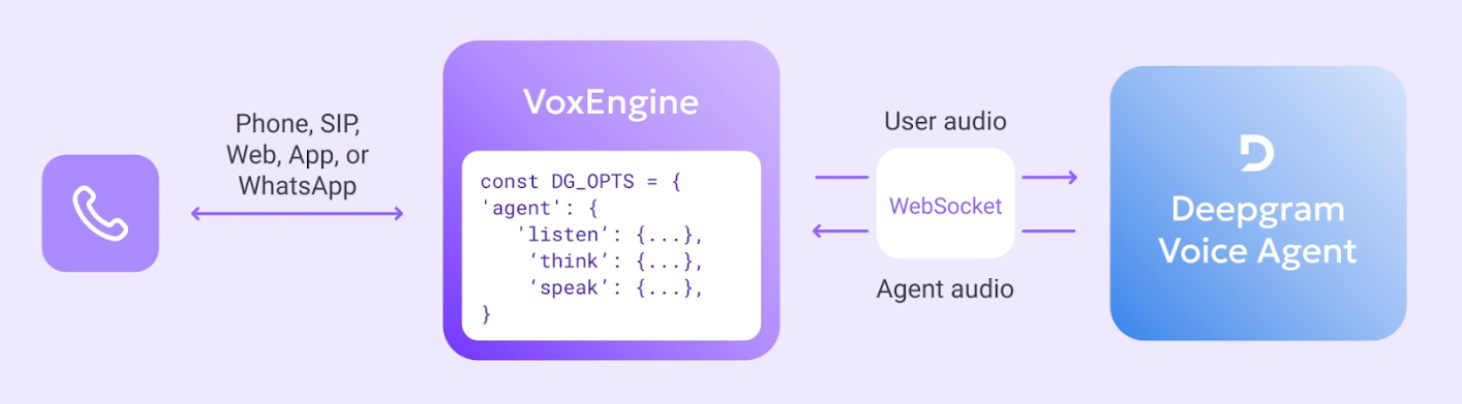
The native Deepgram module connects any Voximplant call to Deepgram’s Voice Agent API for real-time, speech‑to‑speech conversations. The integration supports bi-directional audio from phone numbers, SIP trunks, WhatsApp, or WebRTC into Deepgram’s unified agent environment (STT + LLM + TTS) and play responses via Voximplant’s serverless runtime with minimal latency.
Capability and feature highlights:
- Delivered as a Voice AI Connector inside VoxEngine: you define Deepgram STT, LLM, and TTS parameters; Voximplant handles telephony, media conversion, and streaming WebSockets.
- Fully exposes Deepgram speech recognition, a wide variety of LLM models, and speech synthesis options from Deepgram and partners.
- Bridge PSTN, SIP, WebRTC, or WhatsApp calls into Deepgram Voice Agent using a single VoxEngine scenario.
- Keep conversations natural with low-latency turn‑taking and barge‑in.
- Apply and update agent configuration mid-call.
- Subscribe to Voice Agent events (for example
AgentThinkingandHistory). - Handle function calls for external integrations.
Demo video
Deepgram Voice Agent on Voximplant: Enterprise-ready Voice AI Phone Calls with Context Memory
Architecture
Prerequisites
A Deepgram API key is required. Visit https://console.deepgram.com/signup to create a Deepgram account if you don’t have one already.
Then visit the Deepgram console to create an API key and copy its secret value.
Use that secret value as your credential in VoxEngine (stored under DEEPGRAM_API_KEY).
This is shown in the demo video above: Getting your Deepgram API Key.
Development notes
- Native VoxEngine module: load with
require(Modules.Deepgram)and create aDeepgram.VoiceAgentClientviaDeepgram.createVoiceAgentClient(...). - Session setup: pass Deepgram’s Voice Agents settings object to specify
agent.listen(STT),agent.think(LLM), andagent.speak(TTS). Do not includeaudiosettings — these are hardcoded by the connector for optimum voice quality with Voximplant. - Events: all Deepgram Voice Agent events are supported under the
Deepgram.VoiceAgentEventsenum. Subscribe to events such asConversationText,AgentThinking,Warning,Error, andHistory. VoxEngine also providesWebSocketMediaStartedandWebSocketMediaEndedfor debugging media flow. - Mid-session updates: update without reconnecting using
sendUpdatePromptandsendUpdateSpeak. Inject text withsendInjectUserMessageandsendInjectAgentMessage. - Function calling: define tools in Deepgram’s
think.functionsarray; handle requests viaDeepgram.VoiceAgentEvents.FunctionCallRequestand respond withFunctionCallResponse. - Barge‑in: listen for
Deepgram.VoiceAgentEvents.UserStartedSpeakingand callvoiceAgentClient.clearMediaBuffer()to cancel current TTS audio when the user interrupts. - Deepgram ASR is a different module: this connector is independent of VoxEngine’s existing Deepgram ASR module (
VoxEngine.createASR). You can align ASR parameters with your Voice Agentlistenconfiguration for consistent transcription before/after the agent is invoked.
See the Deepgram module API reference for full details on methods, events, and types and the examples in this section for usage.
Examples
- Example: Answering an incoming call
- Example: Placing an outbound call
- Example: Function calling
- Example: Context history with ApplicationStorage
Links
Voximplant
- Deepgram Voice AI Connector overview: https://voximplant.com/products/deepgram-client
- Deepgram Voice Agent getting started guide: https://voximplant.com/docs/voice-ai/deepgram/voice-agent-api-client
- Deepgram module API reference: https://voximplant.com/docs/references/voxengine/deepgram
- Voice AI product overview: https://voximplant.ai/
Deepgram
- Voice Agent API docs: https://developers.deepgram.com/docs/voice-agent
