

xAI realtime TTS
Use XAI.createRealtimeTTSPlayer to synthesize text as it arrives, for example from an LLM. Voximplant manages the xAI WebSocket connection and sends the generated audio to the call.
For an agent that receives caller audio and generates responses directly, use the Grok Voice Agent API. To combine separate STT, Grok reasoning, and TTS, see Microsoft-Grok-Grok TTS.
Setup
Create a VoxEngine scenario and assign it to an application’s routing rule. Route an inbound phone number, SIP user, WebRTC user, or app user to the rule. Require Modules.XAI in the scenario.
Pass voice and language in connectionParameters when creating the player. Both must be non-empty strings. The example uses eve and English (en). Voximplant fixes the audio format for telephony to PCM at 16 kHz.
Optional: bring your own xAI API key
The apiKey parameter is optional. To use your own xAI account, store its API key in Voximplant Secrets as XAI_API_KEY. The example reads it synchronously with VoxEngine.getSecretValue('XAI_API_KEY') and passes it only when present. Omit the secret to use Voximplant’s provider credentials and TTS billing.
With your own key, xAI bills provider usage to your account; Voximplant connectivity charges also apply. See Voximplant pricing for current rates.
Custom voices
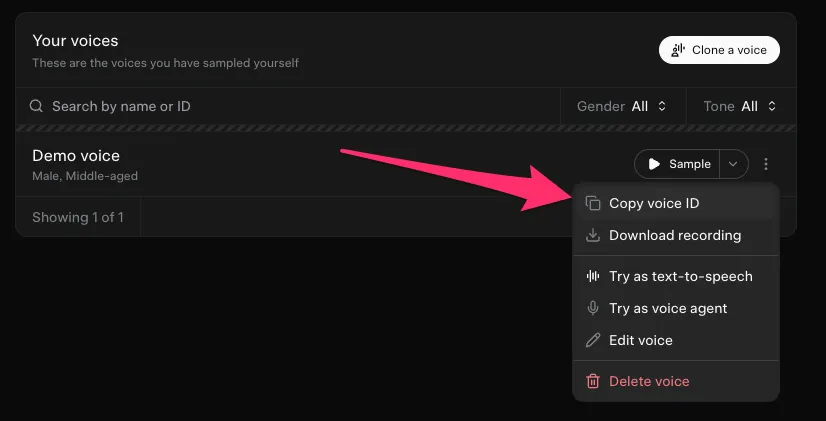
Create a custom voice in the xAI console or with the Custom Voices API. Use your own xAI API key with access to that voice. In the console, open the voice card’s three-dot menu and choose Copy voice ID. Pass the copied string as connectionParameters.voice when creating the player.
Speech tags
xAI supports inline tags such as [pause], [laugh], and [exhale], plus wrappers such as <whisper>...</whisper>, <fast>...</fast>, and <emphasis>...</emphasis>. Use them sparingly to shape delivery. The scenario includes pauses, emphasis, and a whispered aside. See the xAI speech tag reference for the current set.
Stream text into a call
The example waits for the incoming call to connect, creates a player, and streams six utterances on one connection. streamText() splits each utterance into chunks while preserving spaces and punctuation. It sends each chunk as text.delta, then sends text.done to finish the utterance. The chunks simulate text arriving from an application; a real LLM stream can supply its deltas directly.
Listeners are registered before sending text. The sample logs the shared player lifecycle events, playback errors, and each utterance’s timeToFirstByte in milliseconds. It stops the player and cancels both timers on disconnect, error, completion, or the 60-second demo deadline.
Playback and interruptions
Send native xAI message objects with player.send(): use text.delta with a delta string for each chunk, followed by text.done to flush the accumulated text. Sending text.done keeps the connection open for another utterance.
Listen for PlayerEvents.AudioChunksPlaybackFinished before advancing to the next utterance or ending the call. xAI sends audio.done when synthesis finishes; Voximplant reports the event after the generated audio chunks finish playing. The event’s timeToFirstByte measures the delay from sending the request to receiving the first audio byte. It does not measure playback duration.
To interrupt an utterance, call player.clearBuffer(). The integration sends text.clear to xAI and clears buffered playback. Connect this operation to your application’s speech detection or interruption signal. A TTS player does not detect caller speech itself.
If the demo is still running after 23 seconds, its timer simulates an interruption and sends a replacement utterance. For caller-driven barge-in and end-of-turn detection, use the cascaded pipeline example. Call player.stop() when the player is no longer needed.
Connection options
The optional connectionParameters fields speed, optimize_streaming_latency, and text_normalization are forwarded to the provider. Omit them to retain xAI defaults. The example sets optimize_streaming_latency: 1; compare quality and latency for your application before choosing a value.
The xAI streaming TTS API also documents codecs, sample rates, MP3 bit rates, and timestamp alignment for direct provider connections. Voximplant’s player uses fixed PCM at 16 kHz; those provider options are not configurable player controls.