

Responses API Example: Microsoft-Grok-Grok TTS
For the complete documentation index, see llms.txt.
Overview
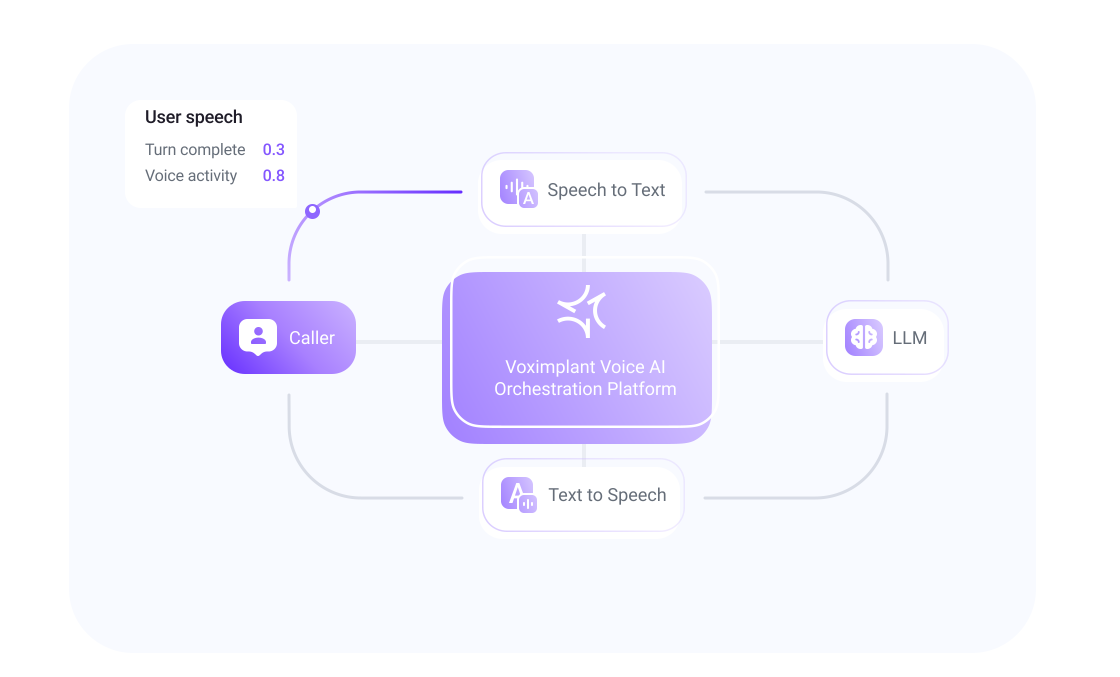
This cascaded pipeline uses separate components for each stage:
- Microsoft streaming speech recognition transcribes caller audio.
- Grok processes completed user turns through VoxEngine’s OpenAI-compatible Responses client.
- Grok realtime TTS turns the response text into speech.
- Agentic VoiceDSP coordinates speech detection, end-of-turn detection, and barge-in.
The sample uses the grok-4.7 text model at https://api.x.ai/v1. Change GROK_MODEL to another Responses-compatible model available to your xAI account when needed. STT, reasoning, and TTS can each be replaced with another supported provider.
For a direct speech-to-speech integration, use the Grok Voice Agent. For standalone speech output without STT or an LLM, see xAI realtime TTS.
Jump to the Full VoxEngine scenario.
Prerequisites
- Create a VoxEngine scenario and route an incoming call to it through an application’s routing rule.
- Store an xAI API key with Responses API access in Voximplant Secrets as
XAI_API_KEY. This key is required for the LLM; the scenario also uses it for TTS. - The example imports
Modules.Agenticand creates VoiceDSP directly; no preceding helper scenario is required.
How it works
- After the call connects, the scenario creates Microsoft ASR with interim results and phrase hints.
- It creates
OpenAI.createResponsesAPIClient({ baseUrl: "https://api.x.ai/v1" }). Voximplant handles provider requests and exposes Responses events through the client. Agentic.createVoiceDSP({ asr: stt, ... })receives the same Microsoft ASR instance used for call media. VAD starts a user turn; Smart Turn ends it.TurnStopped.contentsupplies the latest transcript snapshot after the configured 0.3-second ASR grace window. The sample waits for this event instead of sending duplicate requests fromTurnInferenceTriggered, which carries no transcript.ResponseTextDeltaevents supply text toXAI.createRealtimeTTSPlayer().ResponseTextDonesendstext.doneto finish the TTS utterance.- Caller media flows independently to ASR and VoiceDSP. VoiceDSP does not replace Microsoft transcription. TTS media flows back to the caller. Noise suppression is omitted.
- A greeting request starts the conversation.
storeContext: truelets the Responses connector maintain context across requests.
Barge-in and response lifecycle
When VoiceDSP emits TurnStarted, the scenario marks the caller as speaking and invalidates any pending response, including one that has not produced speech yet. The scenario calls ttsPlayer.clearBuffer(), which sends text.clear and clears queued playback. It also marks the current LLM response as discarded. Both late text deltas and late text completion events are ignored.
The current VoxEngine Responses client exposes createResponses() and close(), with no per-response cancellation method. The sample lets the interrupted request finish silently and queues the next completed user turn until ResponseCompleted. This prevents an old response from resuming when a later user turn ends. It does not cancel provider inference or its billing.
Requests are serialized, and a newer completed user turn replaces any queued turn. On call failure, disconnect, ASR, Responses, VoiceDSP, or TTS error, or the three-minute demo deadline, the scenario closes the Responses client and VoiceDSP, stops ASR and TTS, and terminates. If the caller hangs up during asynchronous setup, the newly created resource is closed when setup resolves.
Playback and idle tracking
The first accepted text delta signals signalAssistantTurnStarted() as text is queued for speech. ResponseCompleted is the end of inference, not the end of playback. After ResponseTextDone, the next AudioChunksPlaybackFinished signals signalAssistantTurnEnded(). Intermediate chunk completions do not mark the assistant idle. Interruption clears TTS and ends that assistant turn immediately. The 30-second TurnIdle event ends the demo only when no user turn, response request, or assistant playback is active.
Developer notes
- The prompt requests short, speakable text and occasional xAI speech tags, such as
[pause]or<emphasis>...</emphasis>. - The TTS adapter uses PCM at 16 kHz. Configure
voice,language, and the documented connection options. - The sample logs Responses lifecycle events and TTS time to first byte. Use these logs when checking your own account and model; they do not replace listening to a test call.