

Child accounts
Learn how to understand user and account management to design your application properly.
Account users
Voximplant application users are the end users of the application, and Voximplant developers can control each user account balance by setting the parent_accounting parameter to false (via the AddUser and SetUserInfo methods) or specifying this setting in the control panel (the Separate account balance checkbox) while creating/editing the app user.
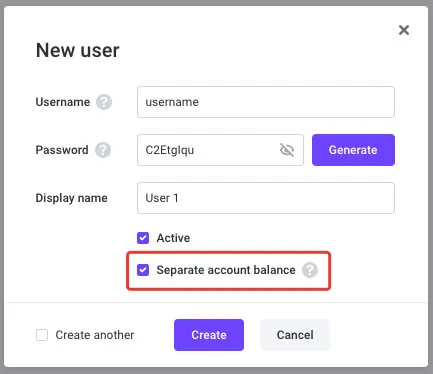
It is possible to transfer funds from the developer account to an app user account and back via the TransferMoneyToUser method.
Independent child accounts
Let us imagine that a developer is building a Cloud PBX service where every company has its own account balance and controls users’ account balance (if required). The developer has their account balance where they put funds to divide them up among the companies.
For this type of service, Voximplant offers child accounts that are created by the developer with the help of their parent account credentials. To create a child account, use the AddAccount method.
This functionality is disabled by default, and developers need to ask the Voximplant team to enable it.
Purpose
Child Accounts operate as standalone entities, they do not share applications, scenarios, and balances with each other. They, however, have access to the parent’s scenarios. Creating a child account is handy when you need to separate your customers, so each child account can represent each customer, but there is only one parent account “to rule them all”.
Frequently asked questions
What is the difference between users, subusers, service accounts, and child accounts?
Users are necessary to log in to client applications and use calls, conferences, and messaging. They may have their own balances to control the spending. Subusers are necessary to give your developers limited access to your Voximplant control panel. They have different roles and different access levels to your account. Service accounts are necessary to provide API access to your account. They have different roles and different access levels to management API. Child accounts are independent subaccounts within your main account that have independent applications, scenarios, and balances but have access to your main account scenarios. You can use child accounts in Cloud PBX services to divide the customers between different accounts.
I have 3 child accounts. How do I transfer an incoming call from child account 1 to a user from child account 2?
You can receive the call on the first child account, then transfer the call to the second child account’s user via the callSIP method. Use the username as the user part of the SIP address, and the application address as a domain part of your SIP address. For example: user@application.account.voximplant.com. You also need to whitelist the following IP addresses from your second child account.
Can I use applications from my parent account?
No. Child accounts have access to the parent account’s scenarios, but they do not have access to the parent account’s application. You need to create an application on your child account.