iOS: Collecting logs

Collect iOS SDK logs for troubleshooting in Voximplant.
View as Markdown

This article will help you to collect logs from iOS SDK and WebRTC.

Contents:

Collect logs from the Xcode console

iOS SDK prints the logs to the Xcode console in debug mode without any additional setup.

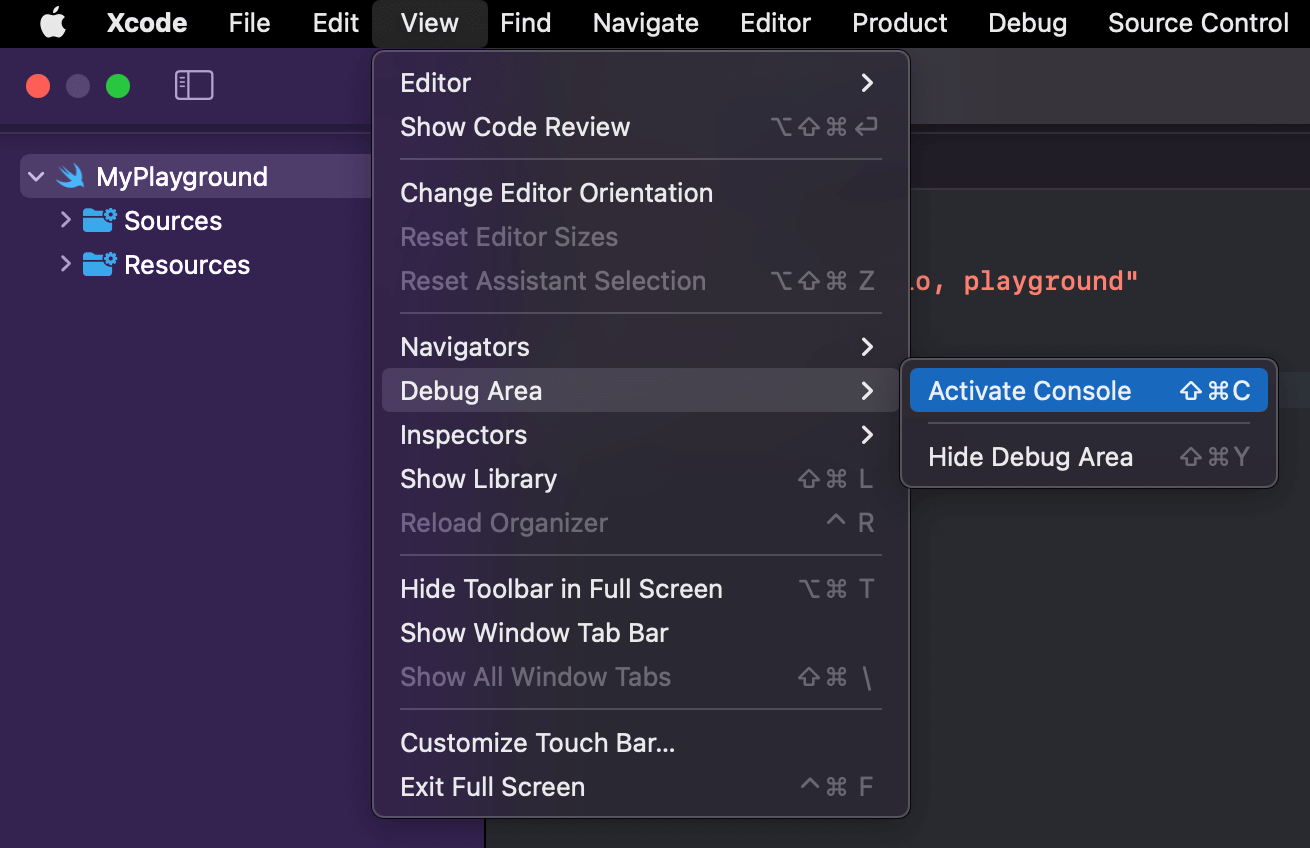
  1. Open Console from the menu bar by selecting ViewDebug AreaActivate Console.

Xcode console

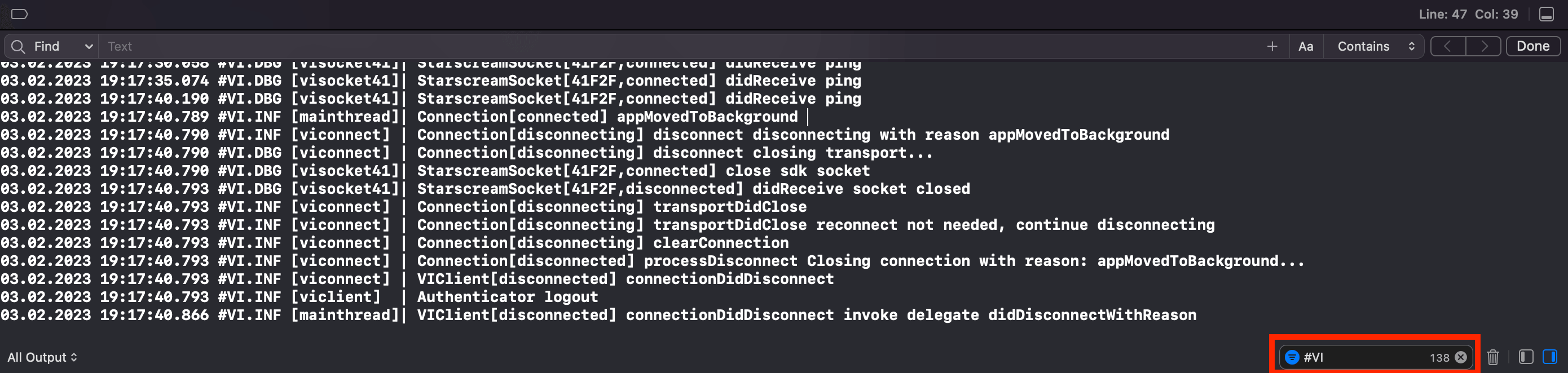
  1. Add a #VI tag in the console filter.

VI tag

  1. Once the collection is complete, select everything with ⌘ + A, paste it into any text editor, and save the file. The recommended file extensions are “.log” and “.txt”.

Write logs to a file

There are two ways of writing logs to a file: via VILogDelegate or CocoaLumberjackSwift.

Collect logs to a file via VILogDelegate

Voximplant iOS SDK provides the VILogDelegate protocol to collect the SDK log messages and save them in any convenient place, for example into a file.

VILogDelegate protocol allows the applications to implement a log handler method that provides the following information:

  • The log message level represented by VILogSeverity enum
  • Log message in String format

It is recommended to add a timestamp to each log message before writing it to a file.

Sample FileLogger
1import VoxImplantSDK
2import Foundation
3
4final class FileLogger: NSObject {
5 static var shared: FileLogger = FileLogger()
6
7 private let dateFormatter = DateFormatter()
8
9 private var logFilePath: URL? {
10 if let documentsFolder = FileManager.default.urls(for: .documentDirectory, in: .userDomainMask).first {
11 return documentsFolder.appendingPathComponent("VoxImplantSDK.log")
12 } else {
13 print("Documents folder not found, skipping")
14 return nil
15 }
16 }
17
18 private override init() {
19 super.init()
20 dateFormatter.dateFormat = "dd.MM.yyyy HH:mm:ss:SSS"
21 // (2) Invoke VIClient.setLogDelegate API to handle Voximplant SDK log messages.
22 VIClient.setLogDelegate(self)
23 }
24
25 private func writeLogToFile(_ text: String) {
26 guard let logFile = logFilePath else {
27 print("File path does not exist")
28 return
29 }
30 if FileManager.default.fileExists(atPath: logFile.path),
31 let fileHandle = try? FileHandle(forWritingTo: logFile) {
32 let string = "\(text)\n"
33 let data = Data(string.utf8)
34 fileHandle.seekToEndOfFile()
35 fileHandle.write(data)
36 fileHandle.closeFile()
37 } else {
38 do {
39 try text.write(to: logFile, atomically: false, encoding: .utf8)
40 }
41 catch {
42 print("Error: \(error.localizedDescription)")
43 }
44 }
45 }
46
47 private func logFormatter(message: String) -> String {
48 let now = Date()
49 let dateString = dateFormatter.string(from: now)
50 return dateString + " " + message
51 }
52}
53
54// (1) Conform VILogDelegate protocol
55extension FileLogger: VILogDelegate {
56 func didReceiveLogMessage(_ message: String, severity: VILogSeverity) {
57 let dateAndMessage = logFormatter(message: message)
58 // (3) Write a log message to a file.
59 writeLogToFile(dateAndMessage)
60 }
61}

Collect logs to a file via CocoaLumberjack

You can also use ready-made logging solutions like CocoaLumberjack. CocoaLumberjack provides additional capabilities for log setup such as the maximum log file size, and cleanup interval.

Preconditions

CocoaLumberjackSwift should be installed first according to its official documentation

Sample FileLogger with CocoaLumberjack
1// import CocoaLumberjack // if the dependency is installed via CocoaPods
2import CocoaLumberjackSwift // if the dependency is installed via SPM
3import VoxImplantSDK
4import Foundation
5
6final class FileLogger: NSObject {
7 static var shared: FileLogger = FileLogger()
8
9 private let voxClientFileLogger = DDLog()
10 private var ddLogLevel: DDLogLevel { .info }
11
12 private var logFilePath: URL? {
13 if let documentsFolder = FileManager.default.urls(for: .documentDirectory, in: .userDomainMask).first {
14 return documentsFolder.appendingPathComponent("VoxImplantSDK.log")
15 } else {
16 print("Documents folder not found, skipping")
17 return nil
18 }
19 }
20
21 private override init() {
22 super.init()
23 configure()
24
25 // (2) Invoke VIClient.setLogDelegate API to handle Voximplant SDK log messages.
26 VIClient.setLogDelegate(self)
27 }
28
29 private func configure() {
30 guard let logFilePath = logFilePath else { return }
31 let logFileManager = DDLogFileManagerDefault(logsDirectory: logFilePath.path)
32 logFileManager.maximumNumberOfLogFiles = 1
33
34 let fileLogger = DDFileLogger(logFileManager: logFileManager)
35 /// Cleanup interval 24 hours
36 fileLogger.rollingFrequency = TimeInterval(60 * 60 * 24)
37 /// Maximum log file size 10MB
38 fileLogger.maximumFileSize = 1024 * 1024 * 10
39
40 fileLogger.logFormatter = LogFormatter()
41 voxClientFileLogger.add(fileLogger, with: ddLogLevel) // Vox Client Log to file
42 }
43}
44
45// (1) Conform VILogDelegate protocol
46extension FileLogger: VILogDelegate {
47 func didReceiveLogMessage(_ message: String, severity: VILogSeverity) {
48 // (3) Write a log message to a file.
49 switch severity {
50 case .debug:
51 DDLogDebug(message, ddlog: voxClientFileLogger)
52 case .info:
53 DDLogInfo(message, ddlog: voxClientFileLogger)
54 case .warning:
55 DDLogWarn(message, ddlog: voxClientFileLogger)
56 case .error:
57 DDLogError(message, ddlog: voxClientFileLogger)
58 case .verbose:
59 DDLogDebug(message, ddlog: voxClientFileLogger)
60 default:
61 DDLogDebug(message, ddlog: voxClientFileLogger)
62 }
63 }
64}
65
66final class LogFormatter: NSObject, DDLogFormatter {
67 private let dateFormatter = DateFormatter()
68
69 override init() {
70 dateFormatter.dateFormat = "dd.MM.yyyy HH:mm:ss:SSS"
71 super.init()
72 }
73
74 func format(message logMessage: DDLogMessage) -> String? {
75 let dateAndTime = dateFormatter.string(from: logMessage.timestamp)
76 return dateAndTime + " " + logMessage.message
77 }
78}

Get a log file from a device

If the application is built in the debug mode, it is possible to get a log file from the device using Xcode.

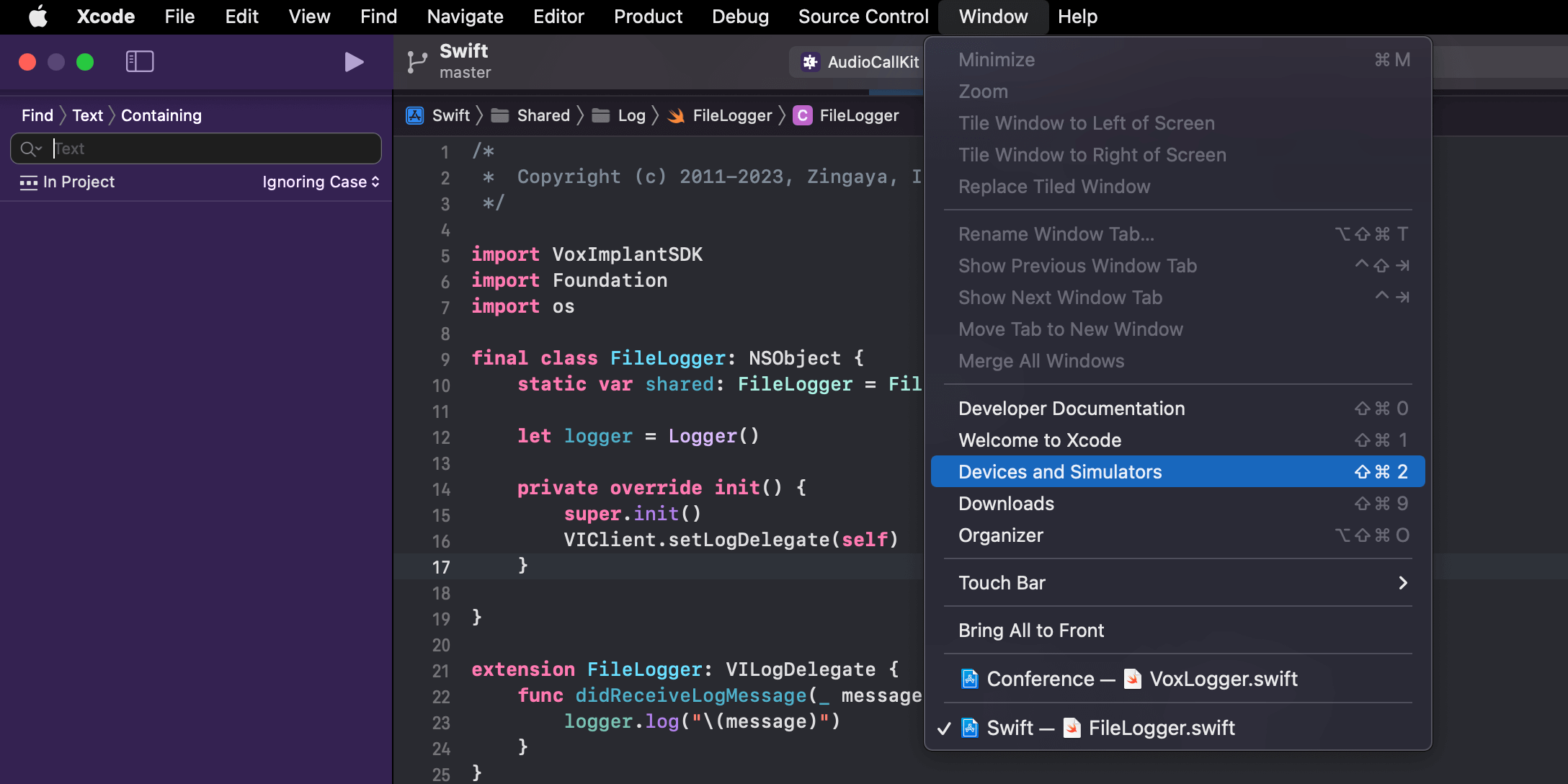
  1. Open Devices and Simulators from the menu bar by selecting WindowDevices and Simulators

Devices and Simulators

  1. Select the device and the application, then download the container.
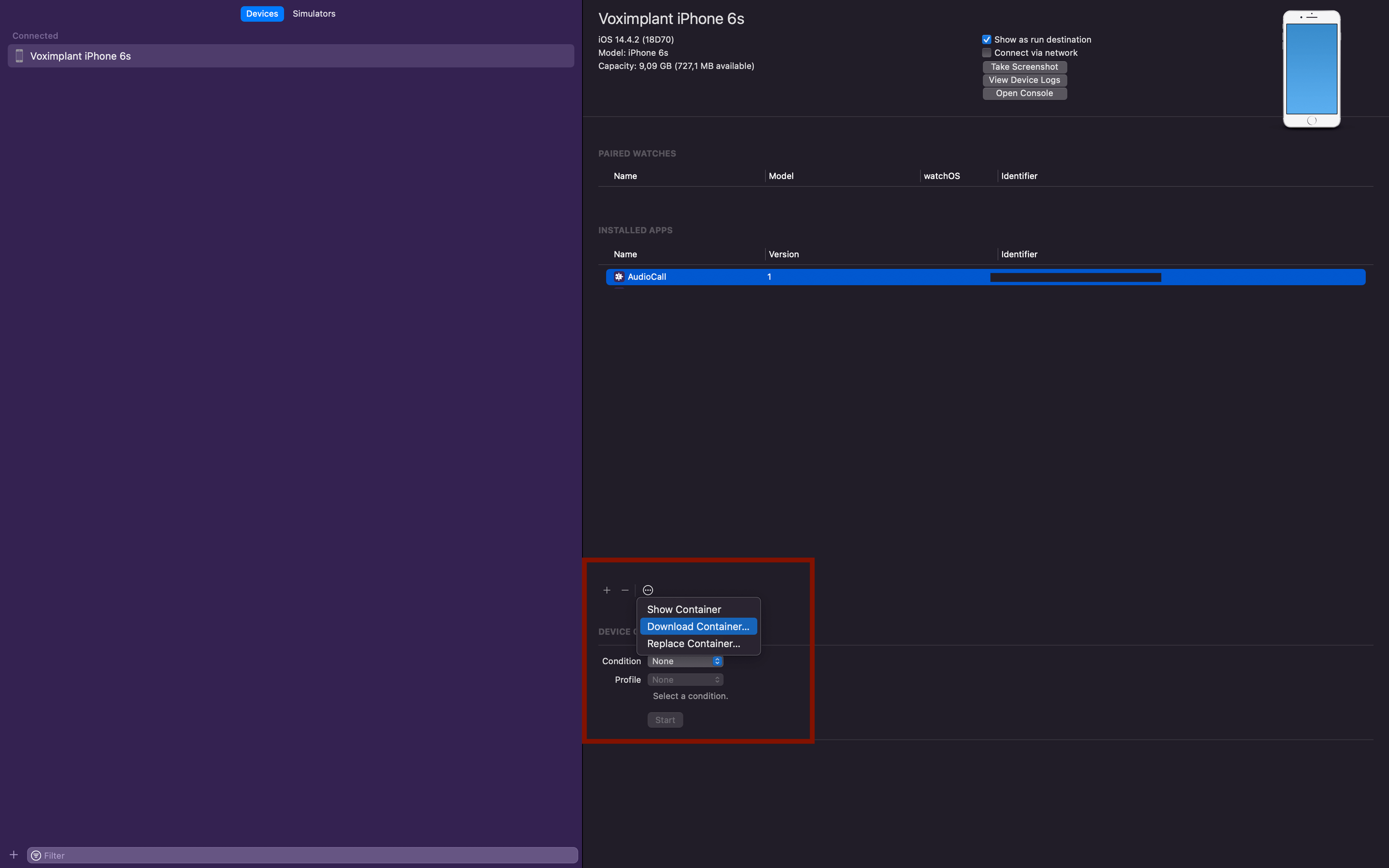
Download container

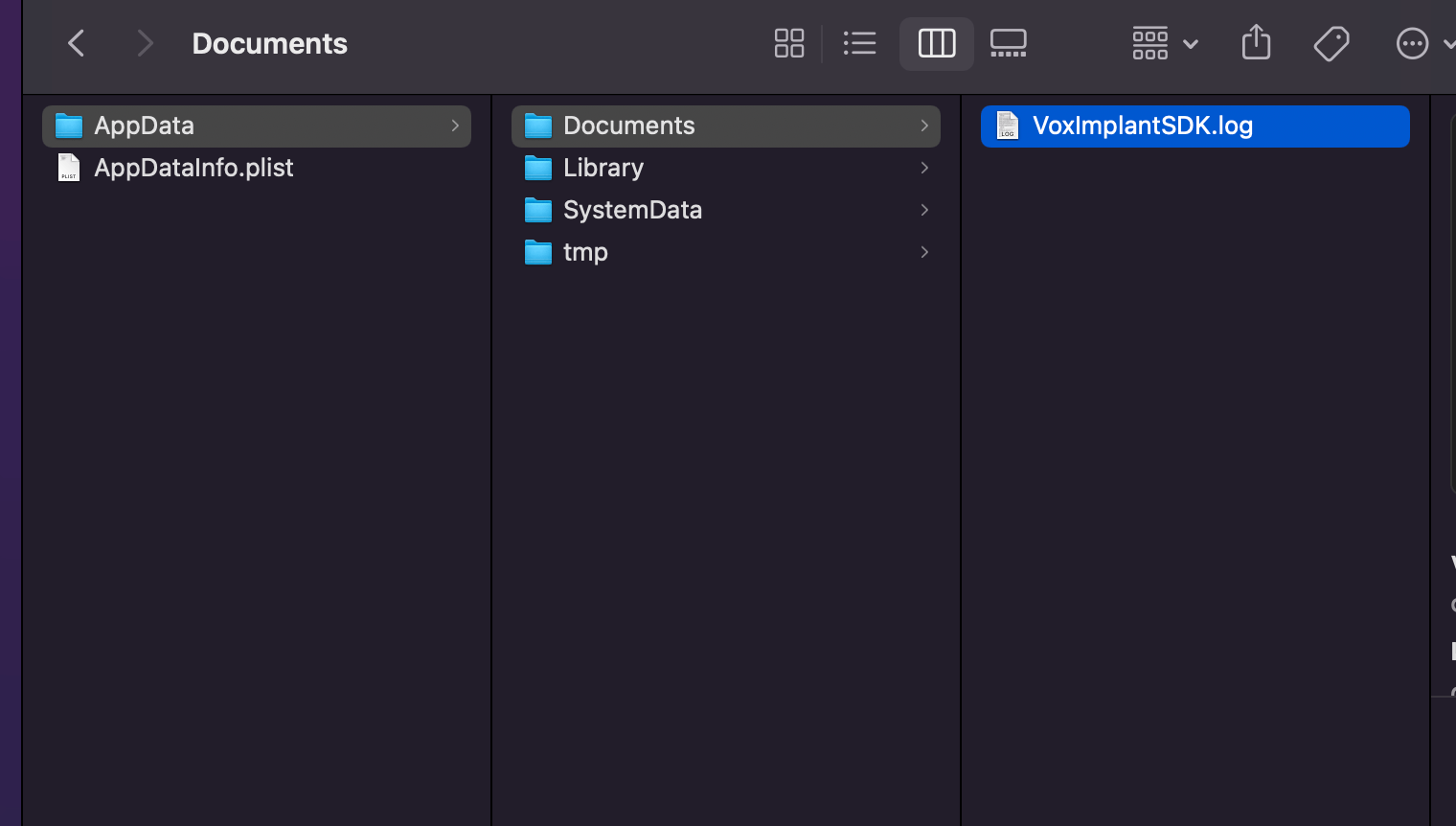
  1. Right-click on the downloaded file with .xcappdata extension and click Show package contents. The log file is located in the AppDataDocuments path.

Contents

Redirect iOS SDK logs to the Mac Console

It is also possible to redirect iOS SDK logs to the Mac Console.

This approach allows developers to collect the logs as well as see them in real-time.

This approach should only be used for debugging purposes.

Redirecting the logs in the production builds can cause security incidents as the logs may contain sensitive information such as Voximplant account name, IP address, text messages received from VoxEngine scenario.

Sample
1import VoxImplantSDK
2import Foundation
3
4// (1) Import os
5import os
6
7@available(iOS 14.0, *)
8final class ConsoleLogger: NSObject {
9 static var shared: ConsoleLogger = ConsoleLogger()
10
11 let logger = Logger()
12
13 private override init() {
14 super.init()
15 // (3) Invoke VIClient.setLogDelegate API to handle Voximplant SDK log messages.
16 VIClient.setLogDelegate(self)
17 }
18}
19
20// (2) Conform VILogDelegate protocol
21@available(iOS 14.0, *)
22extension ConsoleLogger: VILogDelegate {
23 func didReceiveLogMessage(_ message: String, severity: VILogSeverity) {
24 // (4) Redirect the log message
25 logger.log("\(message)")
26 }
27}