
For AI agents: a documentation index is available at the root level at /llms.txt and /llms-full.txt. Append /llms.txt to any URL for a page-level index, or .md for the markdown version of any page.
Platform docsVideosCommunitySign up
CapabilitiesGetting startedVoice AI OrchestrationVoxEngine PlatformAPI ReferenceFAQ
  • VoxEngine Development
    • VoxEngine concepts
    • Applications
    • Users
    • Scenarios
    • Routing rules
    • Phone numbers
    • Calls and sessions
    • Video calls
    • Management API
    • Account subusers
    • Integrations
    • Firewall
    • Cloud IDE
    • Type declarations
    • VoxEngine CI
    • Working with API requests
    • Working with the Voximplant's API
    • Remote session management
    • Key-value storage
    • Secret storage
    • Custom data
    • Limits and restrictions
    • Scenarios troubleshooting
    • How billing works
  • Management API
    • Overview
    • Developer Basics
    • Authorization
    • Callbacks
    • Child accounts
    • Accessing secure objects
  • Web and Mobile SDKs
    • iOS: CallKit
    • Android: ConnectionService
    • Screen sharing
    • Custom video sources
    • Mobile SDK statistics
LogoLogo
Platform docsVideosCommunitySign up
VoxEngine Development

Type declarations

Learn how to use type declarations for writing Voximplant applications in your own IDE with TypeScript.
||View as Markdown|
Was this page helpful?
Edit this page
Previous

Cloud IDE

Next

VoxEngine CI

Built with

On this page
  • What are type declarations
  • How to add the Voximplant type declarations to your IDE
  • See also

In this article, you will learn what are type declarations and how to use VoxEngine type declarations for writing TypeScript code in your external IDE.

What are type declarations

Sometimes, when you write your code, you make typos, and your IDE underlines the typo for you and warns about it. For example:
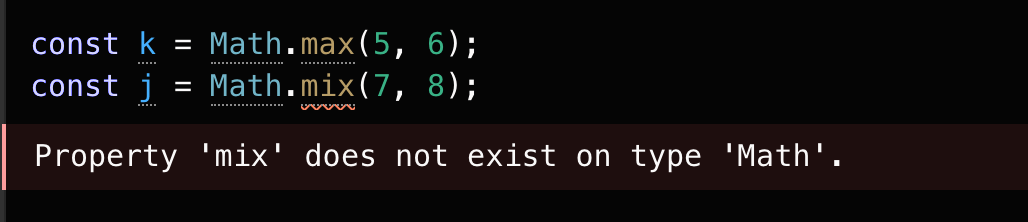
Typo in the code

How does the IDE know, that max is present but mix is not? The answer is that there are declaration files describing these objects. A declaration file provides a way to declare the existence of some types or values without actually providing implementations for those values.

In addition to common JavaScript, you can check Voximplant-related types and values if you write code (e.g. scenarios) in your own IDE. Here is where the external type declarations come in handy.

How to add the Voximplant type declarations to your IDE

In order for your external IDE to correct your scenario code if you make any typos, you need to download and import Voximplant type declarations.

You can download them via the following link:

  • https://cdn.voximplant.com/voxengine_typings/voxengine.d.ts

After you download the file, import it to your project. Depending on your IDE, you need to add it to your project folder, or specify it in the tsconfig.json, and the IDE should automatically recognize it and add type declarations to your project, and check your code as you write it.

See also

  • Voximplant’s Cloud IDE
  • VoxEngine CI to integrate your IDE into the Voximplant Cloud