Account subusers

Grant control panel access without sharing the main account
View as Markdown

Learn about creating and managing Voximplant subusers and their access to different panel sections.

Subusers are entities that grant access to various panel sections. They differ from Service accounts, which are required for interacting with the Management API.

Creating subusers

To create a subuser, follow these steps:

  1. Log in to your Voximplant account.
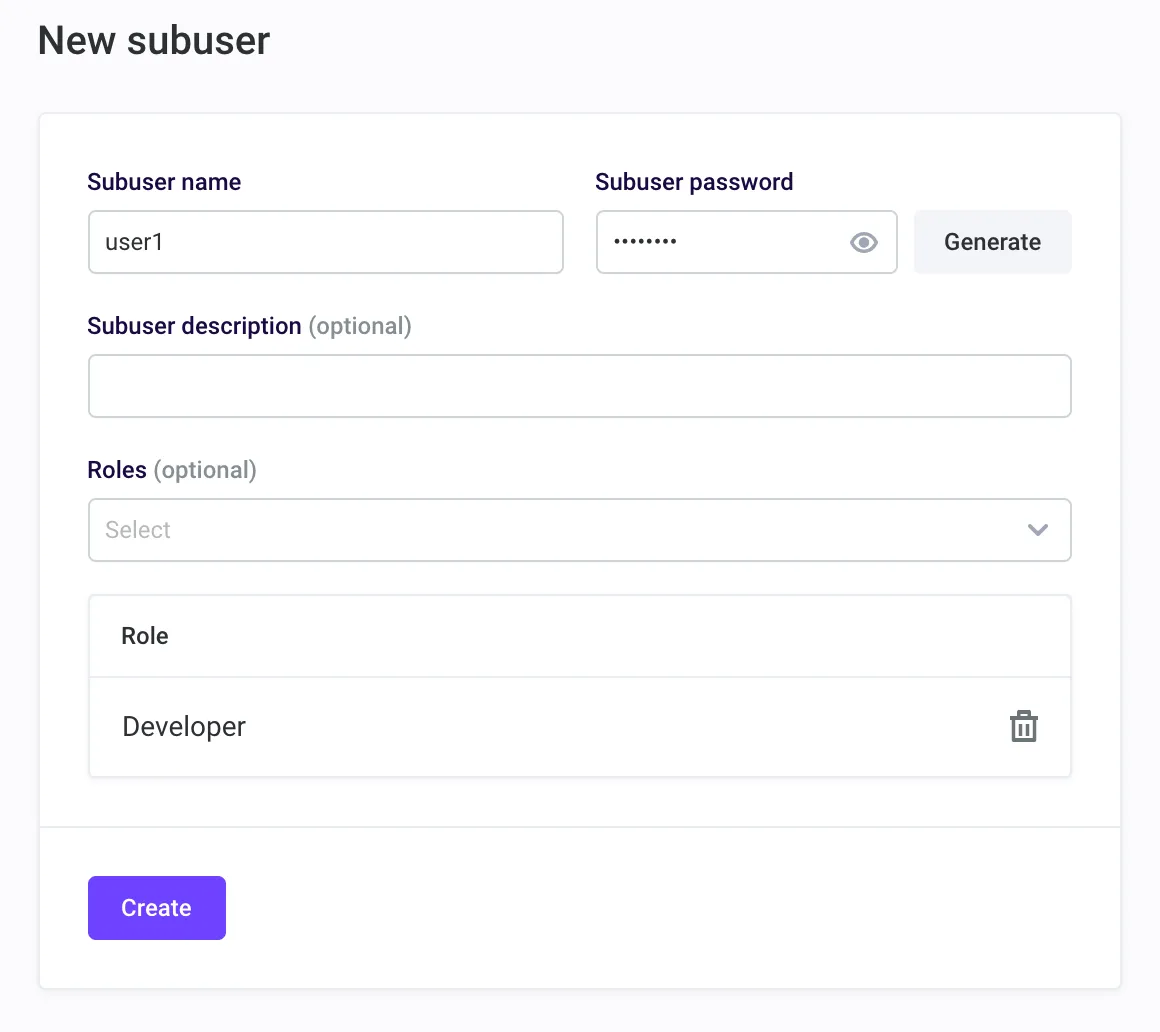
  2. Navigate to the Subusers section of the Voximplant control panel and click Add or Add subuser.
  3. Fill in the necessary details and select a role for your subuser. Refer to the table below for information about subuser roles and their access to different panel sections.
  4. Click Create.

Add a subuser

Upon creating your first subuser, you’ll receive a special link – your subuser login page. This link is the only way for your subuser to log in.

To edit or delete a subuser, use the three dots menu next to it.
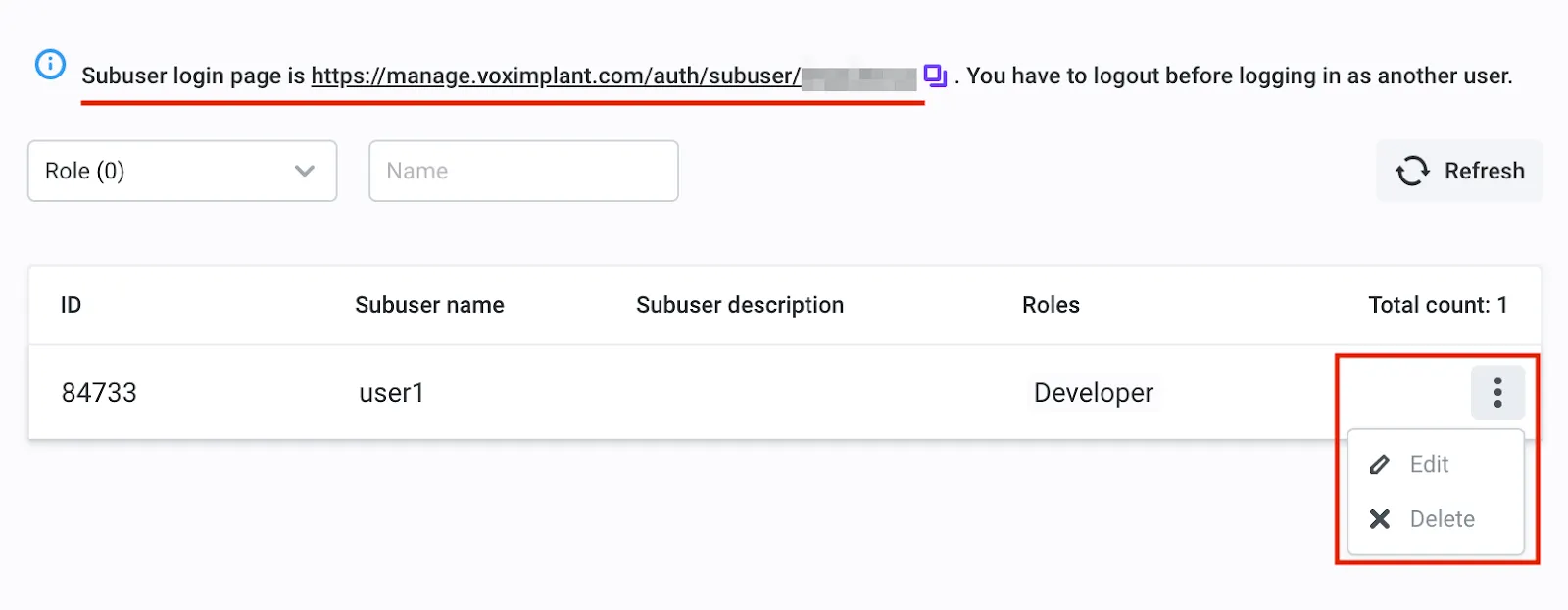
Subuser login link

Subuser access to panel sections

Panel sectionSubuser role
Control panelMainAccount PhoneNumberManager Owner Admin Developer Supervisor Support Accountant CallListManager UserManager Payer PayerNoVerify
ApplicationsMainAccount Owner Admin Developer Supervisor Support Accountant CallListManager UserManager
Certain applicationMainAccount Owner Admin Developer Supervisor Support Accountant
Call history in a certain applicationMainAccount Owner Admin Developer Supervisor Support
Call history downloads in a certain applicationMainAccount Owner Admin Developer Supervisor
Scenarios in a certain applicationMainAccount Owner Admin Developer
Users in a certain applicationMainAccount Owner Admin UserManager
Phone numbers in a certain applicationMainAccount Owner Admin Developer Supervisor Support
Rules in a certain applicationMainAccount Owner Admin Developer
Queues in a certain applicationMainAccount Owner Admin Developer Supervisor
Call lists in a certain applicationMainAccount Owner Admin Developer Supervisor Support CallListManager
Creating a new call list in a certain applicationMainAccount Owner Admin Developer CallListManager
Append new lines to a call list in a certain applicationMainAccount Owner Admin Developer CallListManager
SIP registrations in a certain applicationMainAccount Owner Admin Developer Supervisor Support
Push certificates in a certain applicationMainAccount Owner Admin Developer
Dialogflow agents in a certain applicationMainAccount Owner Admin Developer
Key-Value Storage in a certain applicationMainAccount Owner Admin Developer
All callsMainAccount Owner Admin Developer Supervisor Support
All call downloadsMainAccount Owner Admin Developer Supervisor
All active sessionsMainAccount Owner Admin Developer
All actions with numbersMainAccount PhoneNumberManager Owner
Purchasing a phone numberMainAccount Owner Admin Accountant PhoneNumberManager
Number deactivationMainAccount PhoneNumberManager Owner
Attaching numbers to applicationMainAccount Owner Admin Accountant PhoneNumberManager Developer
Getting the list of purchased numbersMainAccount Owner Admin Accountant PhoneNumberManager Developer Supervisor
Choose available for purchase numbersMainAccount Owner Admin Accountant PhoneNumberManager
Set up number additional parametersMainAccount Owner Admin Accountant PhoneNumberManager
Reserved phone numbersPhoneNumberManager
Blocked phone numbersMainAccount Owner Admin
One-way SMSMainAccount Owner Admin
One-way SMS historyMainAccount Owner Admin
Two-way SMSMainAccount Owner Admin Developer
Two-way SMS historyMainAccount Owner Admin Supervisor Accountant
BillingMainAccount Owner Admin Accountant Payer PayerNoVerify
SecurityMainAccount Owner Admin Developer
API keysMainAccount
WebhooksMainAccount
Caller IDsMainAccount Owner Admin
Notifications settingsMainAccount Owner
SubusersMainAccount Owner
Creating a new subuserMainAccount
Editing a subuserMainAccount
Service accountsMainAccount Owner Admin Developer Supervisor Support CallListManager UserManager
All SIP registrationsMainAccount Owner Admin Accountant
Profile settingsMainAccount Owner Admin Developer Accountant Supervisor Support CallListManager UserManager Payer PayerNoVerify
SupportMainAccount Admin Support
Support ticketsMainAccount
MarketplaceMainAccount
Notification historyMainAccount PhoneNumberManager Owner Admin Developer Accountant Supervisor Support CallListManager UserManager Payer PayerNoVerify
OnboardingMainAccount
LogsMainAccount Owner Admin Developer Supervisor Support

Frequently asked questions

Users are necessary to log in to client applications and use calls, conferences, and messaging. They may have their own balances to control the spending. Subusers are necessary to give your developers limited access to your Voximplant control panel. They have different roles and different access levels to your account. Service accounts are necessary to provide API access to your account. They have different roles and different access levels to management API. Child accounts are independent subaccounts within your main account that have independent applications, scenarios, and balances but have access to your main account scenarios. You can use child accounts in Cloud PBX services to divide the customers between different accounts.

You can use the Supervisor role. It has access to the call recordings.

You can use the UserManager role. It has access to managing SmartQueue users and queues.

The session_id TTL is 8 hours.

No, you cannot hide the account name from the control panel.